A practical guide to exploring access risks across Finance & Operations, CRM and Power Platform—from your first login to an independent review.
Updated AWS evaluation release.
Microsoft customer sign-in is enabled. Licence inventory still requires each customer’s administrator consent. The usage and role optimisation workspace supports reviewed evidence, hypothetical scenarios and read-only collection. Demonstration screenshots use fictional people and prices; they do not establish customer usage or licence eligibility.
The evaluation workspace uses synthetic data.
The application uses synthetic records. Microsoft connection, discovery and onboarding are rehearsals; they do not connect a customer tenant. AI insights assist reviewers; the rules engine retains the authoritative outcome.
01 · Discover
Explore identities, permissions, customisations and execution paths.
02 · Evaluate
Compare business capabilities in their actual legal-entity or business-unit scope.
03 · Review
Keep evidence gaps visible and route decisions to an independent reviewer.
A concrete example
A user who can change supplier bank details and release payments in the same company may have conflicting access. The same permissions in separate companies do not establish that conflict. If a flow’s execution identity is unknown, the result must retain that uncertainty.
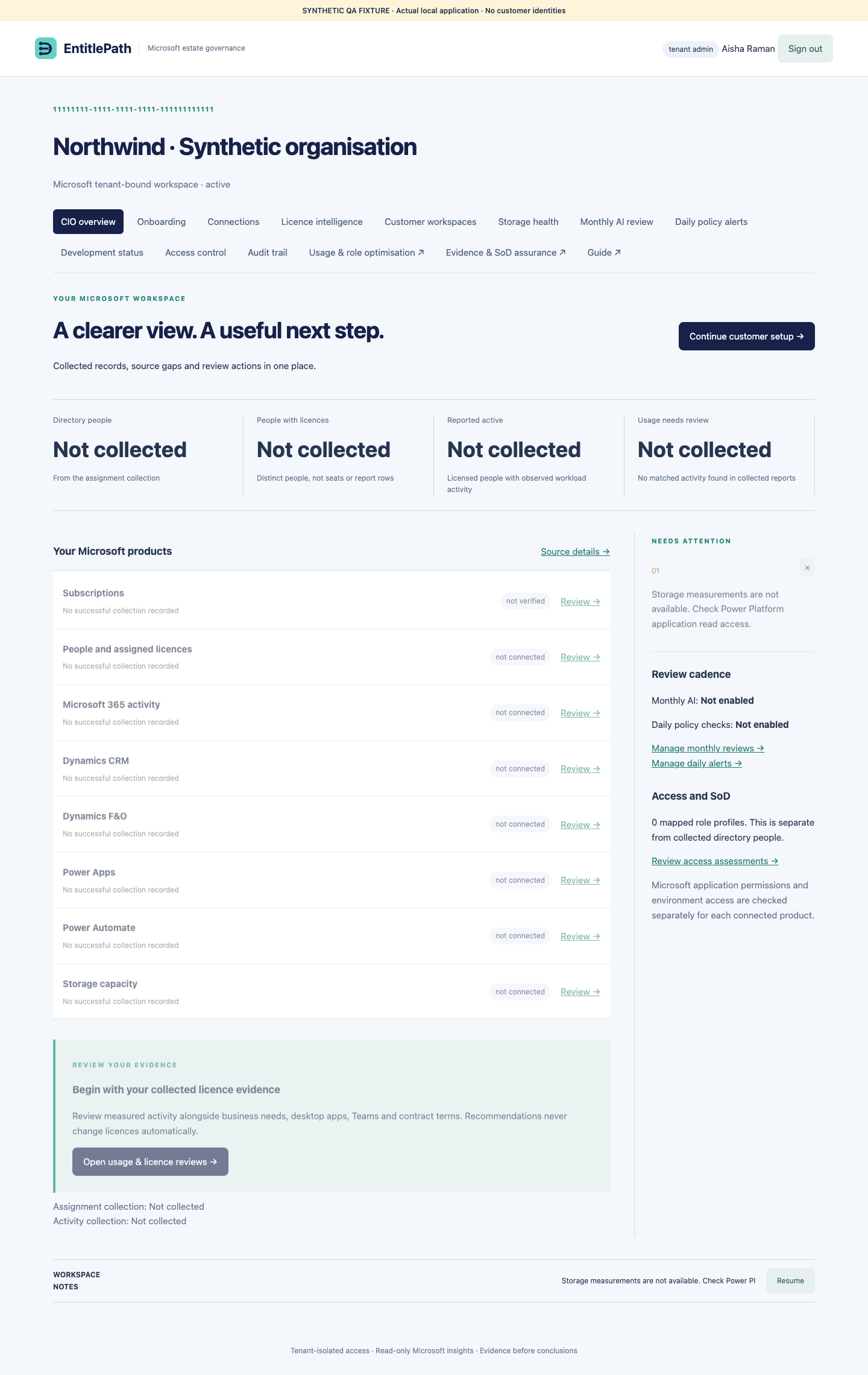
Customer dashboard · Actual application screenshot from an isolated synthetic QA organisation, 7 October 2026. Empty sources remain not collected. Click to enlarge.
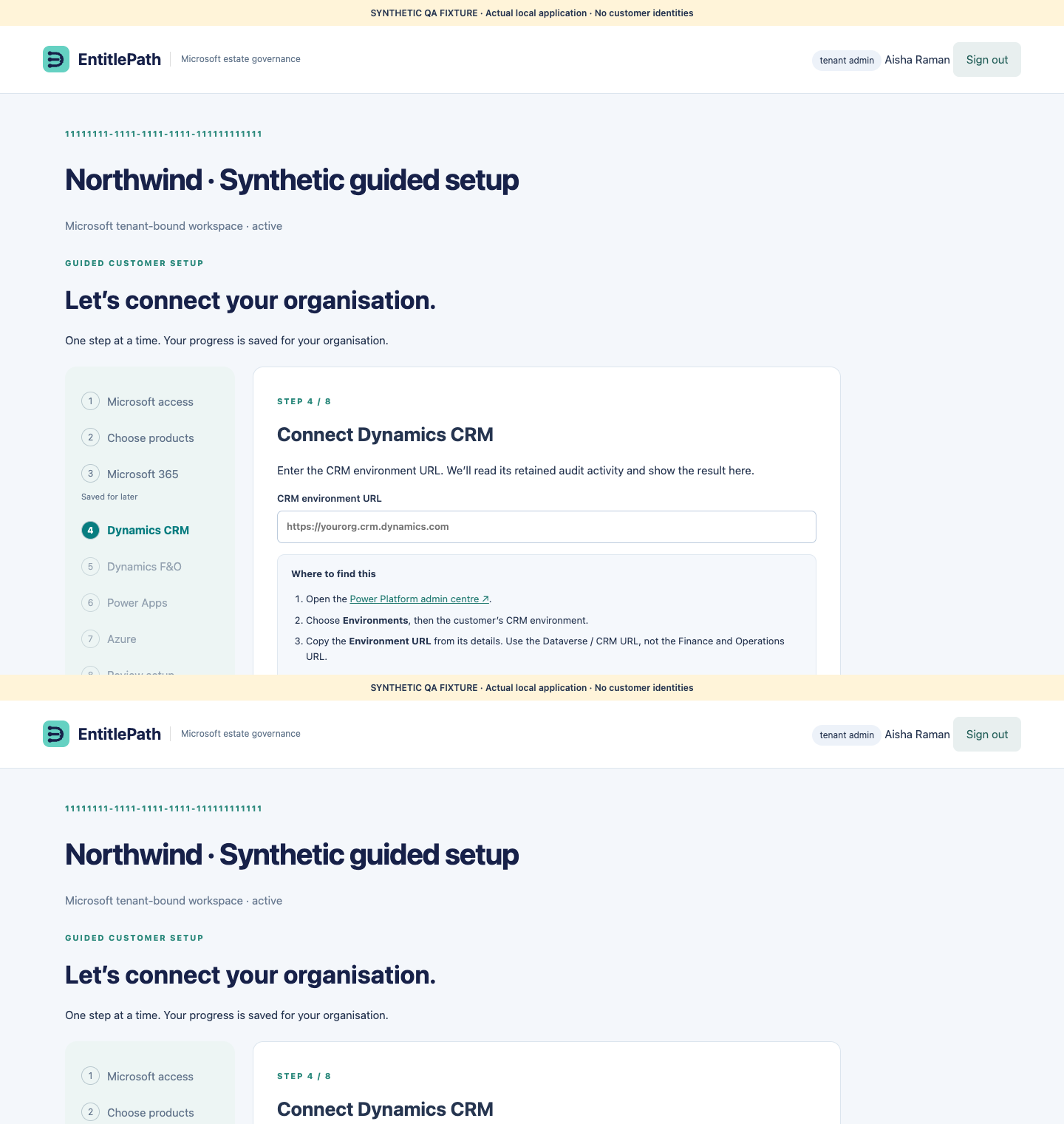
Open Customer setup after Microsoft sign-in. The wizard remembers the last saved step for your organisation. If your session expires, choose Sign in again and resume setup. Earlier steps remain accessible using Back or the step list; unsaved navigation does not change source readiness.
Microsoft access: ask the customer tenant administrator to approve permissions. If already approved, check access.
Choose products: enter the business name and select only the products in this PoC. Ownership details are optional and prefilled.
Microsoft 365: choose Connect and collect. Subscription inventory, assigned licences and 30-day workload activity are collected in sequence.
Dynamics CRM: copy the Environment URL from Power Platform admin centre → Environments → the customer's CRM environment. You can paste its app address; the wizard keeps the environment origin.
F&O and Power Apps: ask the export owner for the published JSON's environment identifier and plain Azure Blob URL. Inline instructions show where to copy the URL. The administrator must first publish the export and grant container read access.
Review setup: check each source's result. Save a product for later if an administrator must complete its setup; it stays visibly deferred.
Setup progress is separate from source evidence and compliance. Azure estate collection is not available in this release. CRM requires an application user and retained audit activity; F&O and Power Apps require customer-published exports.
Actual application screenshot from an isolated synthetic QA organisation · 7 October 2026. No customer identities or credentials.
If collection asks you to wait
A source has a one-minute retry limit. If the last attempt failed, its original error stays visible. A User.Read.All or Reports.Read.All consent failure must be resolved by the administrator of that customer tenant using Review Microsoft permissions; waiting alone will not fix it. The collection button shows a countdown after a rate-limit response. Your saved setup and successful evidence are retained. Back, Save & exit and earlier setup steps remain available. The wizard checks an existing running collection and reuses Microsoft 365 results collected within the last minute rather than starting those sources again.
One-link F&O and Power Apps setup
Your Microsoft administrator supplies one plain HTTPS connection link to the approved usage export. EntitlePath verifies the export’s customer tenant and source and reads its environment ID automatically. Open I need help getting the connection link to download the administrator checklist. Preparing the native export pipeline is still required.
CRM: person access and application access
The background connector uses the EntitlePath application identity. A CRM administrator must add or enable that application user in the selected environment and assign its approved read-only security role. The wizard displays the configured application ID and environment setup steps. Microsoft error 0x80072560 means that this application identity is not recognised as an environment member; the person’s own CRM permissions do not resolve it.
1 GB retained usage-evidence allowance
Each customer has a 1 GB allowance for retained usage collections and reserved writes, with the existing 180-day retention policy. Individual API pages, imports and database writes remain bounded. This does not enable individual 1 GB imports and does not represent Microsoft Dataverse or F&O storage capacity. Reserved capacity from an interrupted write remains counted until its retention expiry.
Large Microsoft 365 directories
Directory reads use small paginated requests. Larger snapshots are stored in immutable tenant-bound chunks; collection success is published only after every chunk is saved. Transport, response-size and permission failures are reported separately. Repeating consent is not a remedy for an oversized response.
Choose the correct workspace
Customer onboarding and pilot access are different.
Customer onboarding uses Microsoft Entra ID. Signing in creates a tenant-bound workspace; a separate administrator-consent step enables subscription reads. If the workspace says pending consent, open Onboarding and complete that step.
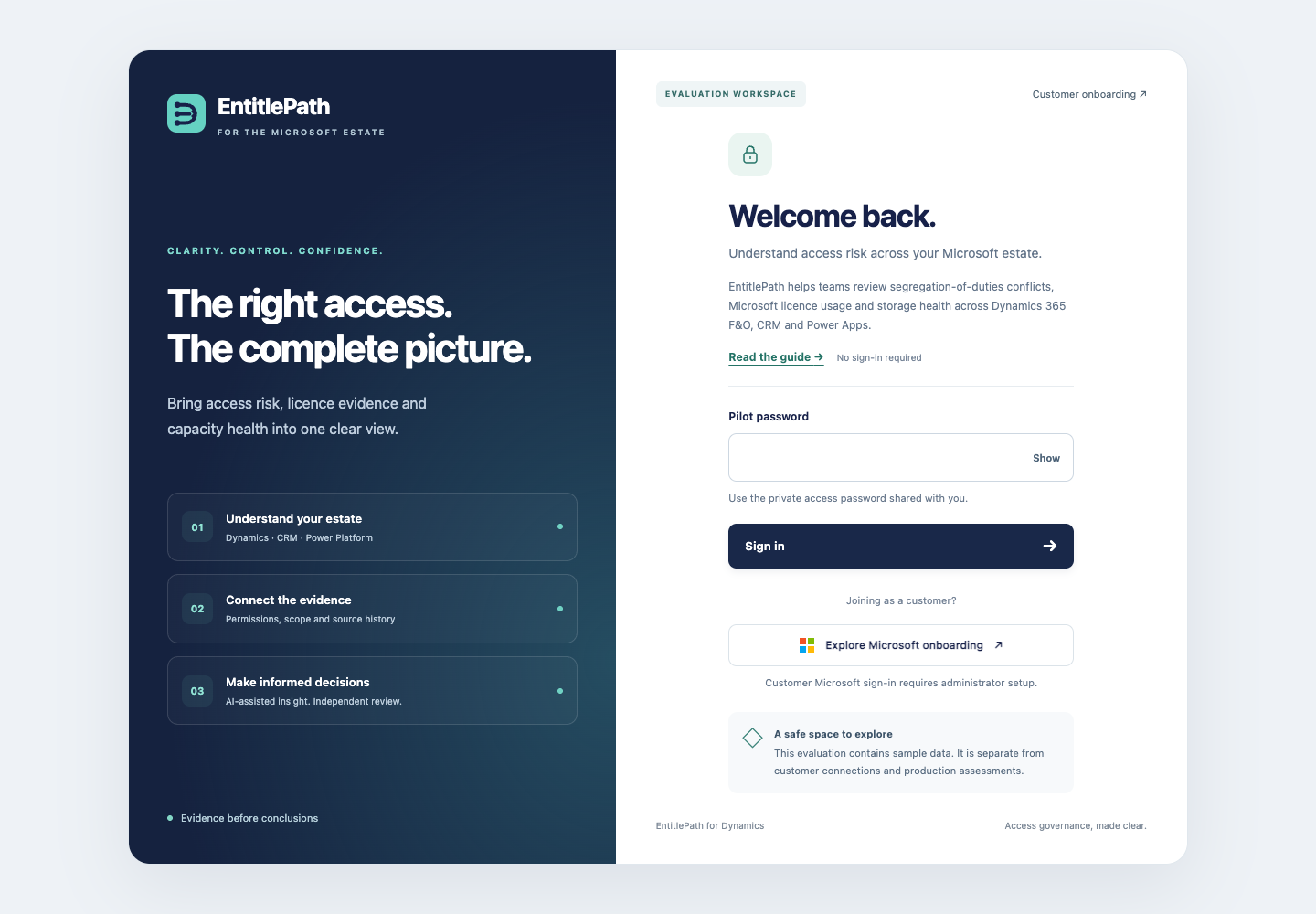
Copy the new password from the private EntitlePath Access file supplied separately. The password is deliberately absent from this guide.
Paste it into Pilot password, then select Sign in.
You will land in the workspace. Use the left navigation to open Onboarding, Findings or this guide.
The shared pilot session lasts up to eight hours. This is a demonstration access boundary; it is not individual Microsoft/Entra sign-in. Keep the access file private.
Redesigned pilot sign-in: private password and separate Microsoft onboarding · Actual deployed AWS evaluation capture, 6 October 2026. Click to enlarge.
If login fails
Copy only the password value, without quotes or extra spaces. Use the AWS URL above rather than the older Sites preview. Too many failed attempts trigger a ten-minute cooldown. A password rotation requires the newly supplied password.
Your first walkthrough
Start with evidence already present in the pilot. You do not need Microsoft credentials or customer data.
Overview: inspect the risk summary and evidence freshness.
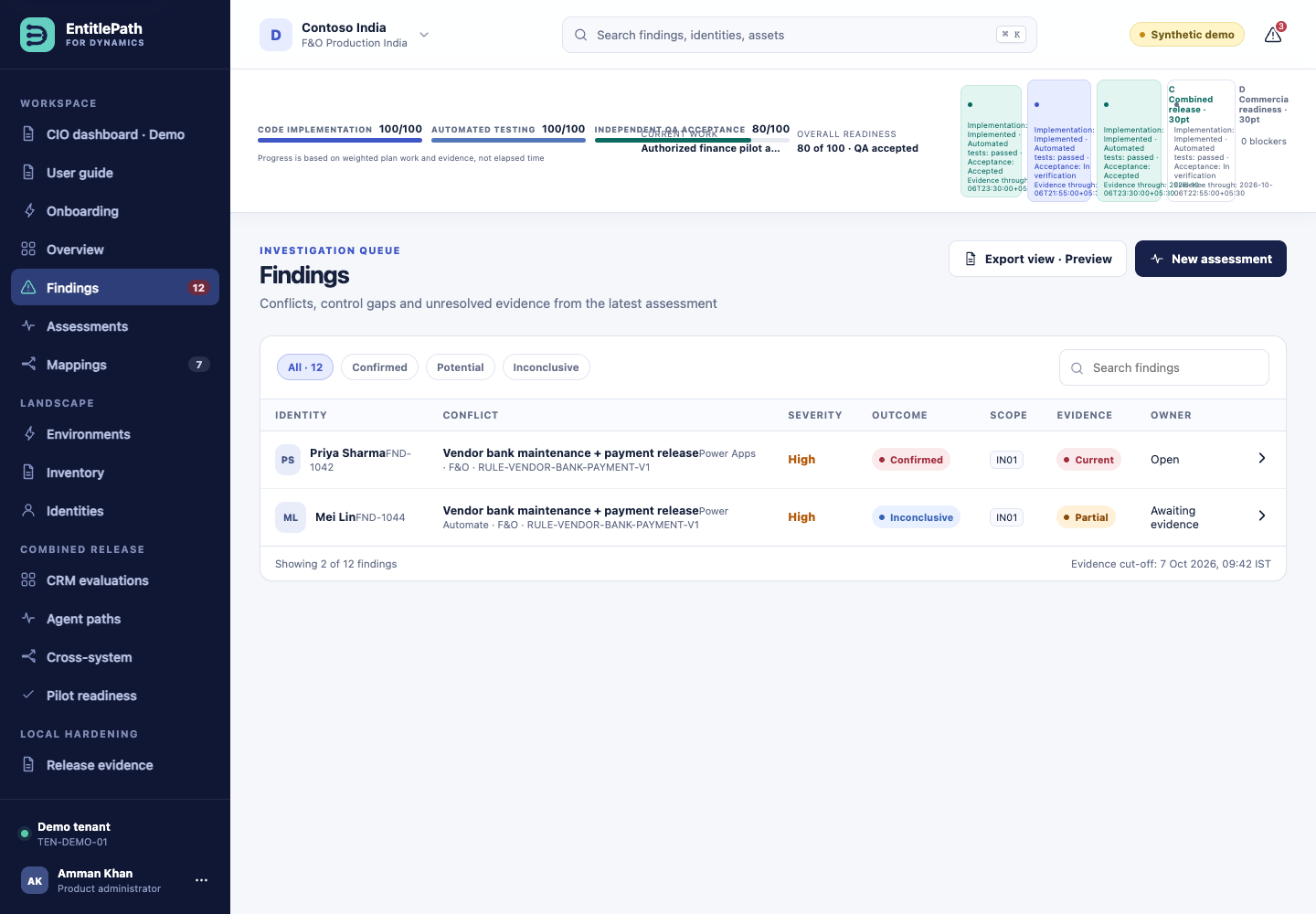
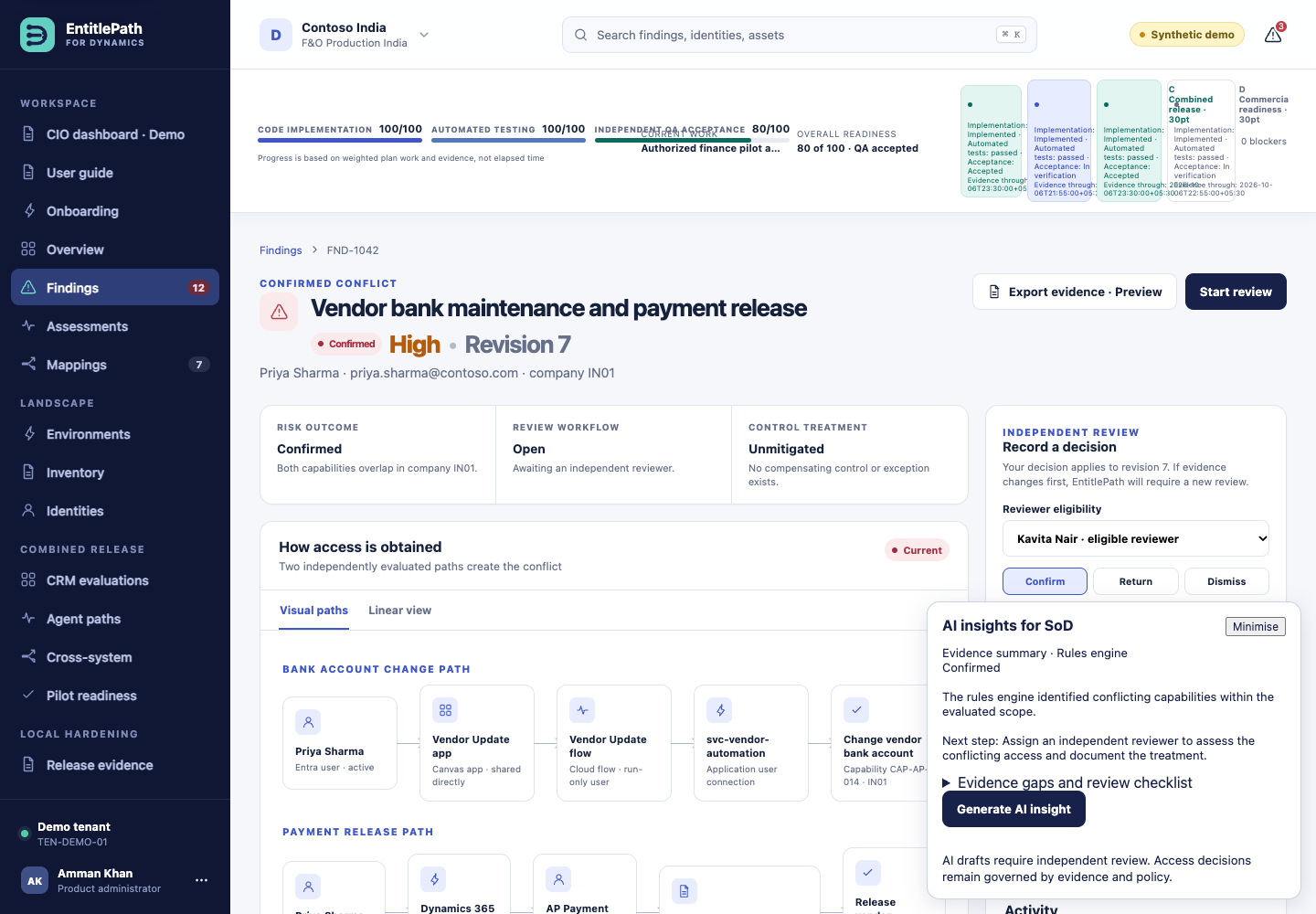
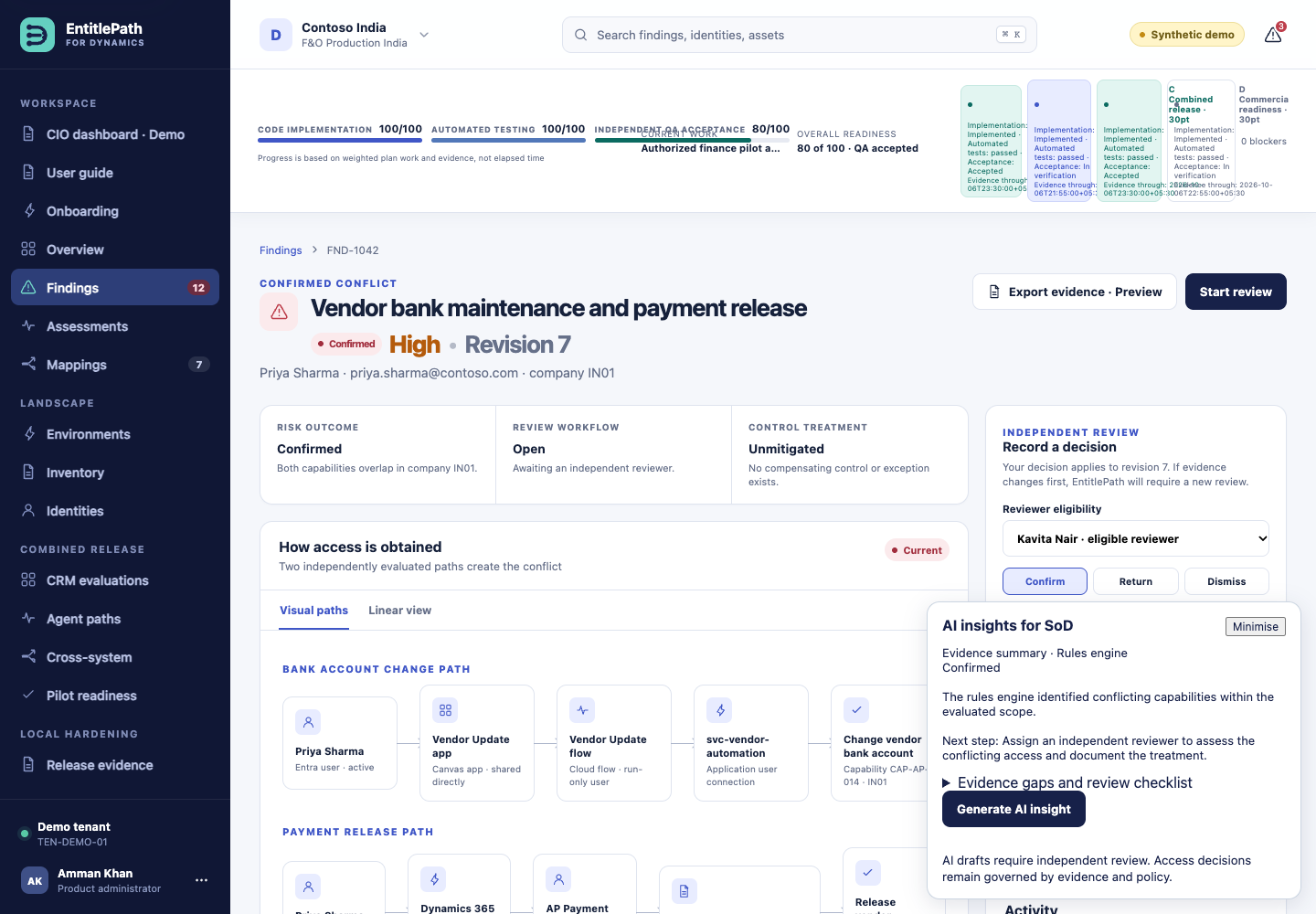
Findings: open FND-1042, the confirmed conflict example.
Follow the paths: compare the bank-account change and payment-release capabilities, the execution identity and their shared IN01 scope.
Compare outcomes: inspect FND-1044 (inconclusive) and EVAL-1043 (no conflict in scope).
Try AI: open a finding and select Generate AI insight in the bottom-right AI insights for SoD panel. Read the original evidence alongside it.
Onboarding: rehearse the guided setup for the synthetic Fabrikam estate.
Progress is not production approval.
Implementation bars describe the fixture build plan. They do not certify live connectors, customer compatibility, compliance or independent QA.
Findings: compare the canonical evaluation outcomes · Actual deployed AWS evaluation capture, 6 October 2026. Click to enlarge.
Rehearse customer onboarding
Ten guided steps show the intended customer journey. Today, this journey uses fixtures and creates no Microsoft connection or source-system change.
Demo onboarding welcome: step 1 of 10, with no real Microsoft connection · Actual deployed AWS evaluation capture, 6 October 2026. Click to enlarge.
Welcome
Select Continue to begin the synthetic Fabrikam setup.
Microsoft connection
Select Sign in with Microsoft. This simulates a directory return; it is not a real Microsoft login. Select Discover environments if offered, then Continue.
Environments
Select the F&O, CRM/Dataverse and Power Platform environments to include. Production and sandbox labels are fixture metadata.
Business scope
Choose legal entities, business units and business processes. Keep IN01, SG01 and Dataverse business-unit scopes distinct.
Permission probes
Select Run PROBE-ONB-001. Review verified, unavailable, denied optional and partial results. Required denied operations block launch.
Policy packs
Choose the vendor/payment, credit-approval and cross-application rule packs appropriate to the rehearsal.
Customisation evidence
Inspect the custom assets and their evidence status. Missing helper source and unresolved flow identities remain explicit gaps. Repository/upload fallback options are not live integrations.
Responsibilities
Keep an eligible independent reviewer selected. The onboarding administrator does not gain independent approval rights.
Coverage preview
Review the selected estate and remaining gaps. Coverage is not a compliance score. The counters shown here are synthetic rehearsal values.
Launch baseline
Read the summary, acknowledge incomplete evidence, then select Launch baseline. Inspect the resulting fixture assessment via View assessments. No customer system is contacted.
Save and resume
Use Save and exit to return to the workspace. Selections are saved by the pilot on this device and through its fixture API. They are not durable customer records: task replacement resets the backend, and clearing browser data can remove local drafts.
Read the evidence before acting
Outcome
Meaning
Next step
Confirmed
The evaluated evidence establishes conflicting capabilities in overlapping scope.
Independent review of the evidence and proposed response.
No conflict in scope
The evaluated paths do not overlap in the assessed scope.
Confirm the scope is complete; this is not a blanket compliance conclusion.
Inconclusive
Evidence, mapping, identity or freshness is insufficient.
Collect the missing evidence and reassess.
Confirmed SoD example FND-1042: paths and advisory insights · Actual deployed AWS evaluation capture, 6 October 2026. Click to enlarge.
Review checklist
Check the subject and active tenant.
Trace both business capabilities back to source evidence.
Distinguish the initiating person from a service or flow execution identity.
Compare the legal entity or business-unit scope.
Check evidence timestamps, mappings and dependencies.
Record a supported review decision using an eligible reviewer. A local review does not remove access from Dynamics.
Make custom access understandable
Custom menu items, plug-ins, APIs and flows can change what a role actually permits. A display name or AI description alone is not sufficient evidence.
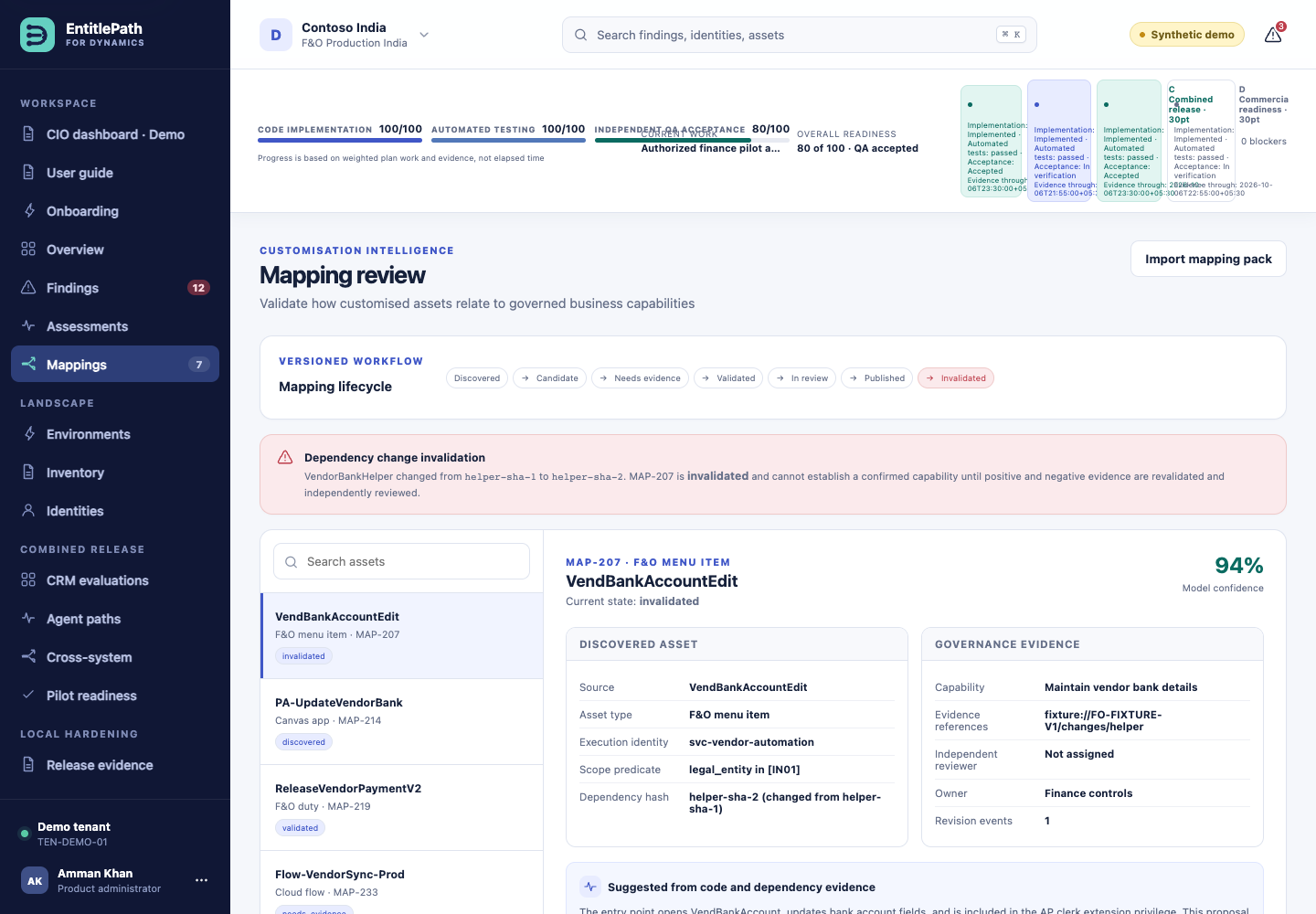
Open Mappings and select a custom asset.
Inspect its proposed business capability, execution identity, scope, source references and dependency version.
Check the mapping’s review state. Proposed mappings need human validation; missing evidence remains unresolved.
If source dependencies change, revisit an invalidated mapping before relying on affected findings.
Mappings: review custom business capabilities and evidence states · Actual deployed AWS evaluation capture, 6 October 2026. Click to enlarge.
For heavily customised estates
Plan to collect the deployed security model, metadata, custom source or signed evidence exports, plug-in registrations, flow definitions and connection principals. The pilot demonstrates these evidence boundaries; production collectors and customer-specific permission tests are still required.
One estate, different access models
Platform
Evidence represented in the pilot
Current boundary
Dynamics 365 F&O
Roles, permissions, entry points, custom helpers and legal-entity scope.
Fixture evaluation; no live customer collector.
Dynamics 365 CRM / Dataverse
Business units, teams, custom APIs, plug-ins and impersonation.
Fixture evaluation; customer compatibility not validated.
Power Apps / Power Automate
Apps, flow paths, connections and execution principals.
No verified legacy AX connector is available in this pilot.
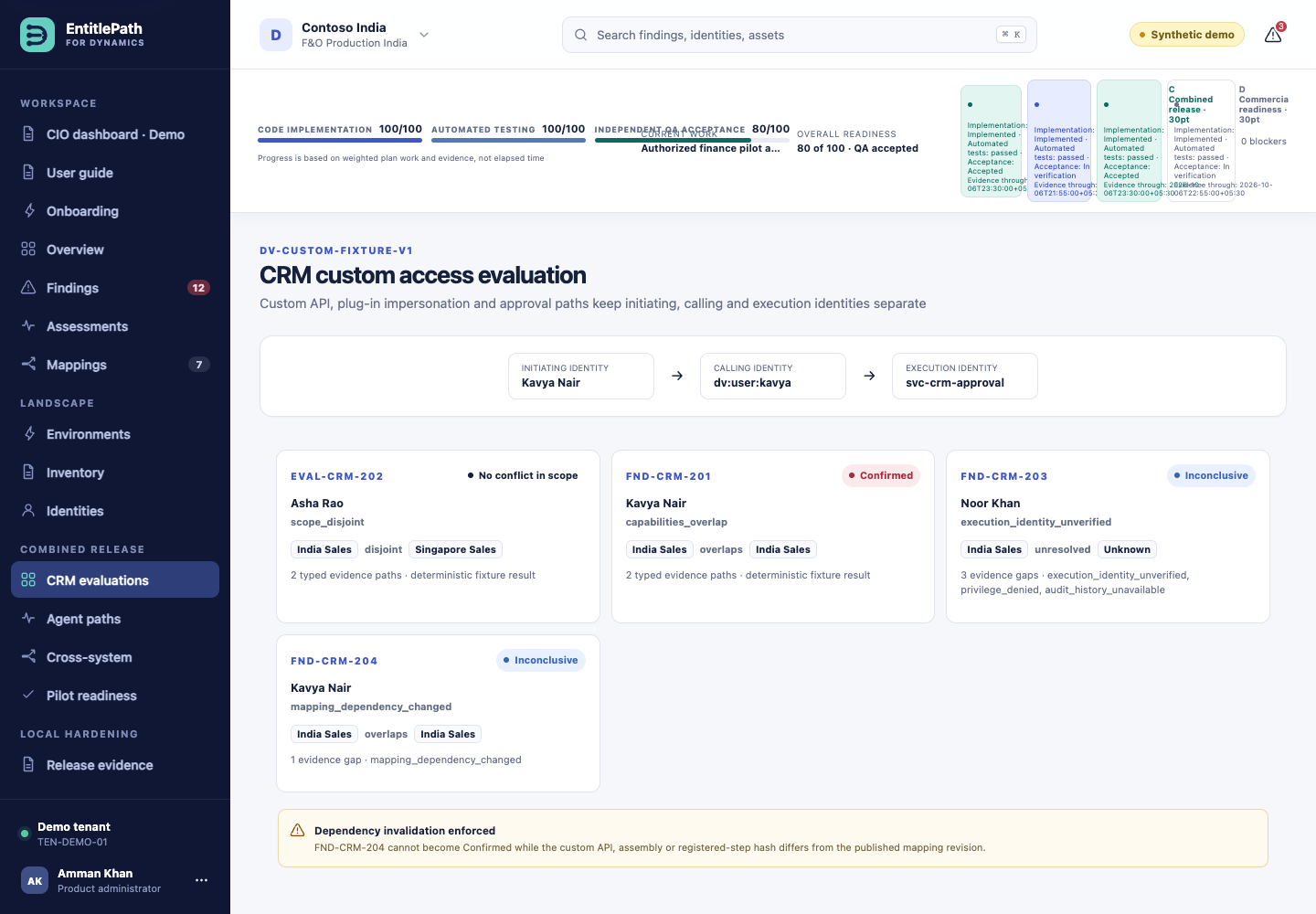
CRM evaluation: initiating, calling and execution identities · Actual deployed AWS evaluation capture, 6 October 2026. Click to enlarge.
Use Cross-system for combined fixture paths and Agent paths for selected Copilot Studio-style tool evidence. Similar names across applications are not proof of the same identity.
AI insights for SoD
Understand the evidence and suggested next step without needing to choose a model.
Open a finding or evaluation, such as FND-1042.
Read Evidence summary · Rules engine, including the authoritative outcome and recommended next step. Expand Evidence gaps and review checklist for source references, dates and reviewer questions. These checks are rules-based, not AI-generated.
Select Generate AI insight. The panel shows queued and analysing states while processing continues.
Compare the completed AI draft with the original evidence. Use Minimise to uncover details behind the panel.
Take any review decision through the normal independent review process.
AI insights for SoD: evidence summary and generation control · Actual deployed AWS evaluation capture, 6 October 2026. Synthetic evaluation only; no customer tenant connected. Click to enlarge.
Advisory only
AI does not approve access, dismiss findings, certify licence compliance or execute remediation. A draft that fails its consistency checks is withheld. An unavailable model produces an explicit error, never an invented insight.
When a request cannot finish
Use Retry AI insight after an unavailable or failed request. If the queue is busy, retry shortly. If your session expires, sign in again. The evidence summary remains the starting point for review; a missing AI draft does not change the finding outcome.
Customer sign-in and access control
Sign-in and consent are separate.
Customer sign-in is enabled. After signing in, open Onboarding, review Microsoft permissions and accept using the customer tenant administrator. If permission was granted elsewhere in Entra, use Recheck existing consent. Verification succeeds only when Microsoft permits the subscription read.
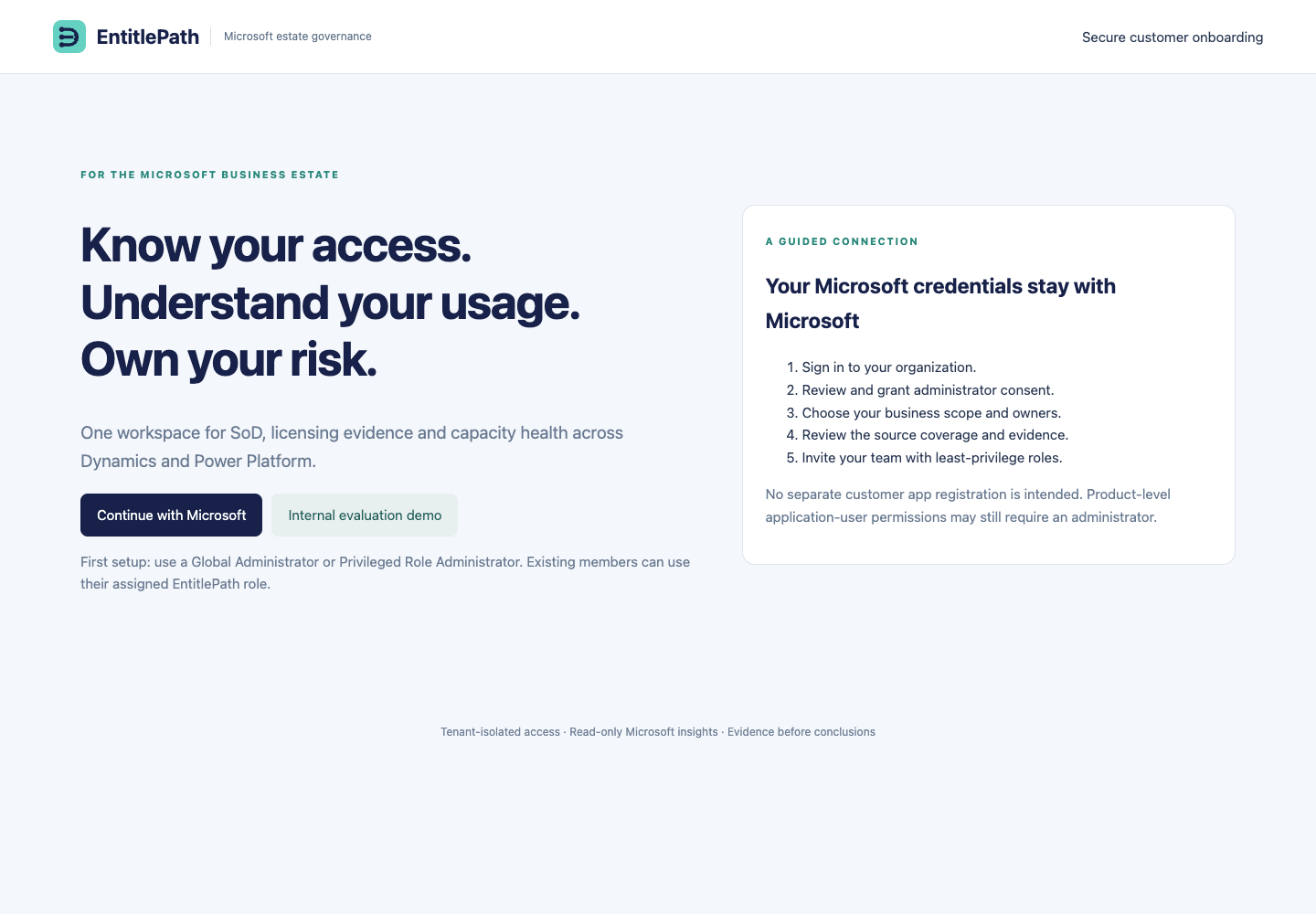
Public customer entry screen captured on 7 October 2026. No customer records or credentials are displayed. Click to enlarge.
Select Continue with Microsoft. For first setup, use a Global Administrator or Privileged Role Administrator in the customer tenant.
Review the requested Microsoft permissions and grant administrator consent. The service verifies access with Microsoft before recording successful licence consent.
Save the organisation, platform selection, environment references, business scope, owner and retention settings.
Review connector coverage. Saving environment names does not establish a connection. F&O, Dataverse and Power Platform need their product-specific permissions and collectors.
Use Access control to invite team members with the narrowest appropriate role.
Invite a colleague
Obtain the colleague’s Microsoft Entra user object ID in the customer tenant.
Select a role and create an invitation. Copy the generated onboarding URL and share it through your approved channel.
The colleague opens the URL and signs in with the matching Microsoft account. The invitation is single-use, expires after 72 hours and is bound to the tenant and object ID.
Revoke unused invitations when necessary. Role changes or disabling a member invalidate that member’s current application sessions.
Role
Customer portal permissions
Tenant administrator
Manage onboarding, members, invitations, licensing and storage evidence; read audit history.
Integrator
Manage onboarding and licensing/storage evidence; cannot manage members.
Analyst
Read estate evidence; finding-read permission is defined for future customer assessment integration.
Reviewer
Read estate and optimisation evidence; record UAT or retain-current decisions for role simulations. Customer SoD finding review remains separate.
Auditor
Read estate evidence, membership and audit history.
Viewer
Read tenant, licensing and storage information.
EntitlePath roles do not grant Microsoft administrator rights. Customer users cannot select a demo actor to gain access. Customer findings and source connectors remain separate release work.
Connected Microsoft workload evidence
The dashboard now shows collected directory people, licensed people, observed active people and unknown activity separately. Licence intelligence shows reported workload activity for each assigned SKU cohort; it does not certify feature use. Use the purchase-evidence form with a dated invoice or contract reference. Exact Business Standard no-Teams, Business Basic and Teams Essentials subscriptions now produce bounded rights-review prompts; no automatic downgrade is approved.
Storage failures are retained in connection history. A capacity permission denial needs application-level Power Platform read access. Add products from the setup summary before providing each environment or export. Monthly reviews and daily checks are configured separately in their own screens.
Compare entitlement, assignment and usage
Evidence-dependent coverage
Microsoft Graph subscription synchronisation runs after verified customer consent. A successful sign-in is not evidence of that consent, actual product usage or a purchased contract. Dated procurement and activity imports remain available.
Open Licence intelligence and check source coverage and observation dates.
An authorised administrator or integrator can synchronise Microsoft subscriptions after consent. Subscription quantities and assignments are not activity measurements.
Import procurement records with dates and evidence references, and usage observations with their measurement period and coverage.
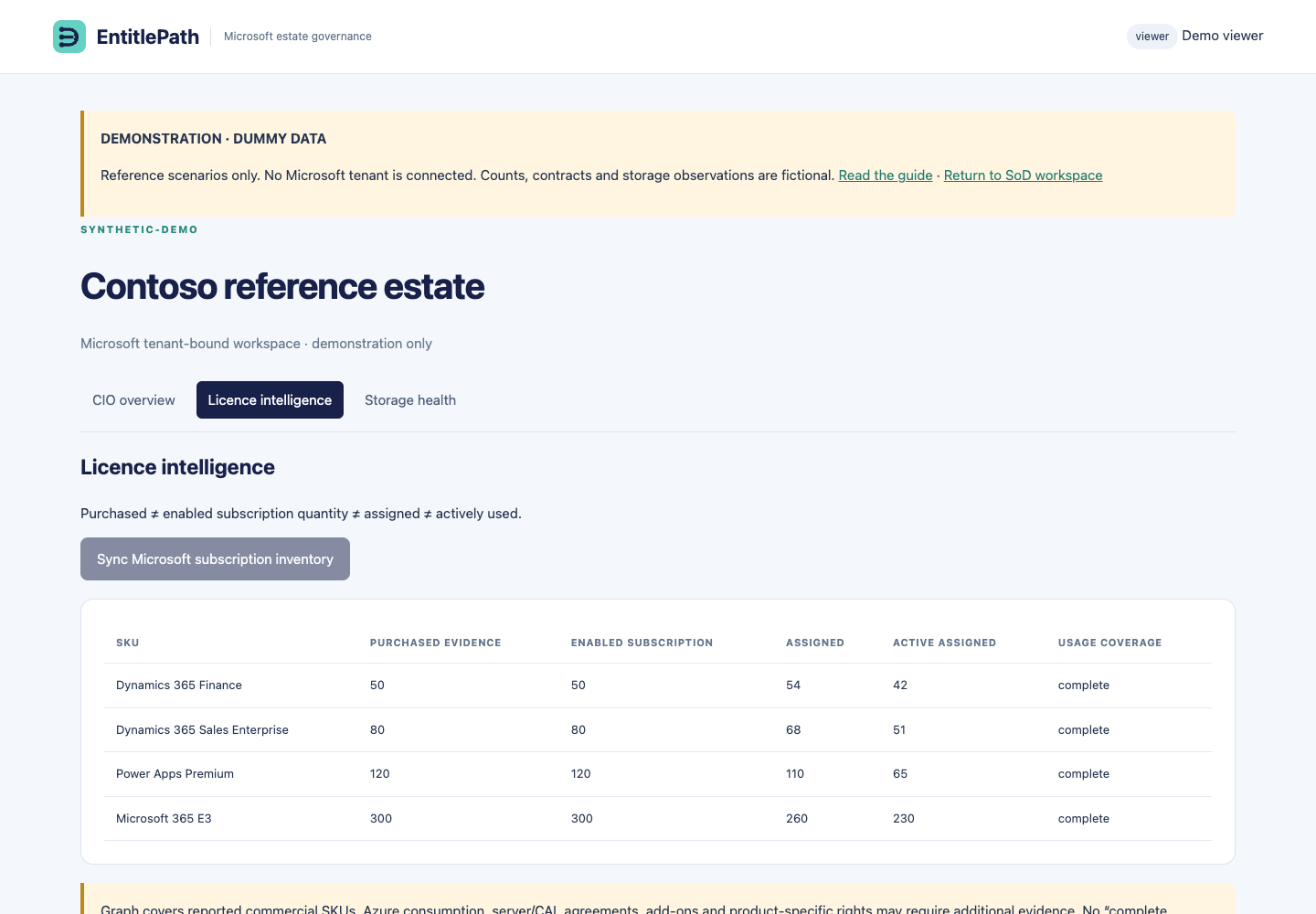
Compare purchased, enabled, assigned and active quantities. Missing evidence is Unknown, not zero usage.
Investigate flagged overassignment, disabled subscriptions and potential optimisation opportunities against the customer’s actual contracts and product terms.
This is not yet a complete Microsoft commercial licensing engine. Base/attach rules, indirect access, device licensing, reservations and contractual exceptions require additional entitlement logic and evidence. No inferred savings or compliance conclusion should be accepted from assignment counts alone.
Licence intelligence: fictional purchased, assigned and active quantities · Actual deployed screen, 6 October 2026. Dummy data for reference only; not customer observations. Click to enlarge.VERSIONED REFERENCE & REVIEW WORKFLOW
Trace an entitlement requirement to its source
Use the catalogue to explore documented product definitions, review rules and official identifier references alongside your customer's actual evidence.
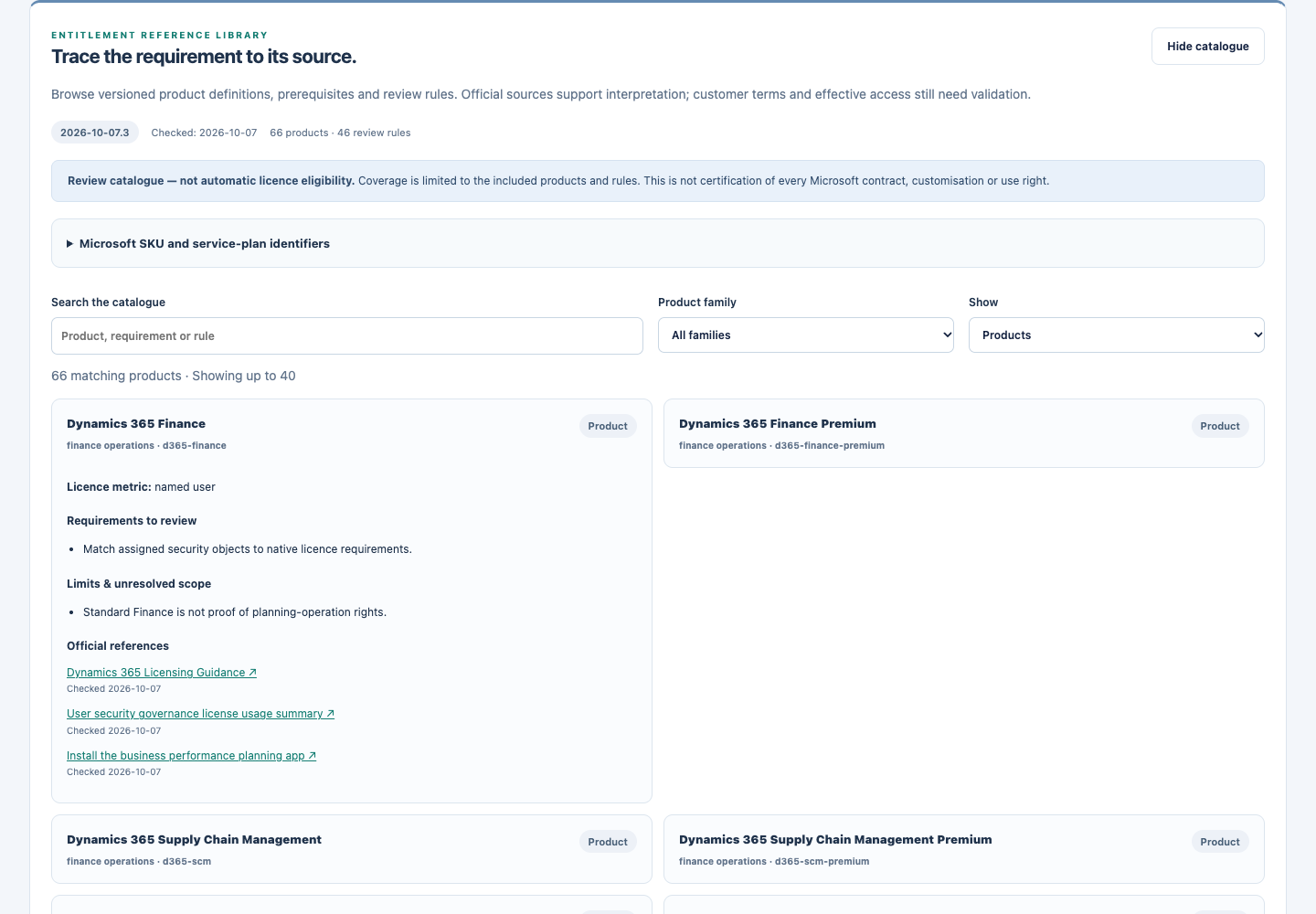
Actual local application capture using the packaged official-source catalogue. The surrounding demo uses synthetic people; catalogue entries are source-backed reference material, not customer entitlements.
Browse products and review rules
Open Usage optimisation and select Explore catalogue. The same read-only browser is available in the synthetic demonstration.
Search for a product, prerequisite or rule and filter by product family. Switch between Products and Review rules.
Expand an entry to read its licence metric, requirements, limitations and linked official Microsoft sources. Check the catalogue version and source review dates.
Use Source register & coverage limitations to understand which products and rules are included. An entry is a review reference, not an automatic licensing decision.
Look up exact Microsoft identifiers
The packaged Microsoft reference snapshot contains 620 exact SKU identifiers and 796 service-plan identifiers, derived from 6,002 reference rows. Open Microsoft SKU and service-plan identifiers, then search by GUID, SKU part number or product name. Results show the SKU GUID, known names and service-plan count; pagination avoids loading the entire index at once.
The snapshot includes its official source, checked date, source revision and SHA-256 digest. These identify the packaged reference version. They do not prove that the customer's purchased agreement is current or that a particular activity is covered.
Identifiers are not complete use rights.
A recognised SKU establishes what a directory identifier refers to. It does not establish base/attach eligibility, premium feature use, multiplexing rights, customisation effects, contract-specific rights or downgrade eligibility. The reviewed rights catalogue is a separate curated set of products and rules.
What a customer recommendation still needs
Purchased terms, assigned SKUs and service plans, and any applicable base/attach or billing prerequisites.
Effective access across relevant roles, groups, teams, environments and custom objects.
Measured source activity with identity, observation windows and explicit coverage gaps.
Reviewed capability mappings, required business duties, SoD checks and authorised customer validation.
Partial entitlement evidence checks show their source references and unresolved evidence. No licence or role is changed by browsing the catalogue. EntitlePath does not certify every Microsoft agreement or replace review of the customer's applicable terms.
Manage your customer team
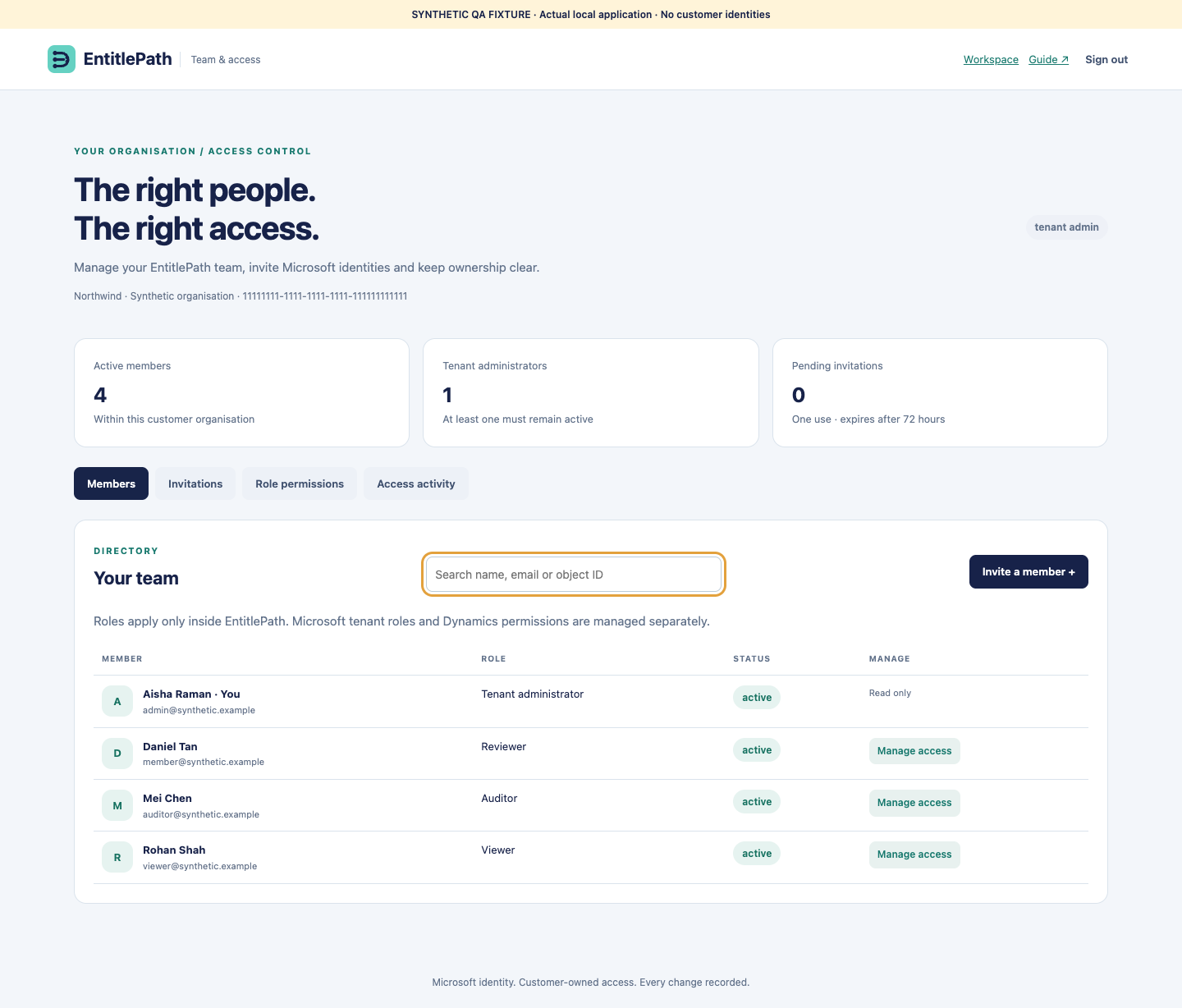
Open User management with your Microsoft account. Each organisation manages its own tenant-bound membership.
A tenant administrator opens the Members or Invitations tab. Use the person's Microsoft object ID from the correct customer tenant; an email address alone does not identify membership.
Choose the minimum required EntitlePath role. Inspect the role-permission matrix before assigning access.
Create an invitation and copy the one-use link privately. It expires after 72 hours. The portal does not send email automatically.
Search existing members to change roles, disable or re-enable access, or revoke their current sessions. A role or status change also invalidates existing sessions.
Review the audit trail. Stale edits are rejected; reload the member before retrying. Administrators cannot edit their own access or remove the last active administrator.
EntitlePath roles apply to this application. They do not create Microsoft users, grant Microsoft administrator roles or assign Microsoft licences. Customers cannot browse another customer's users. Auditor access is read-only; other roles may not open management data.
Actual portal render using isolated synthetic QA accounts.
Read connection status accurately
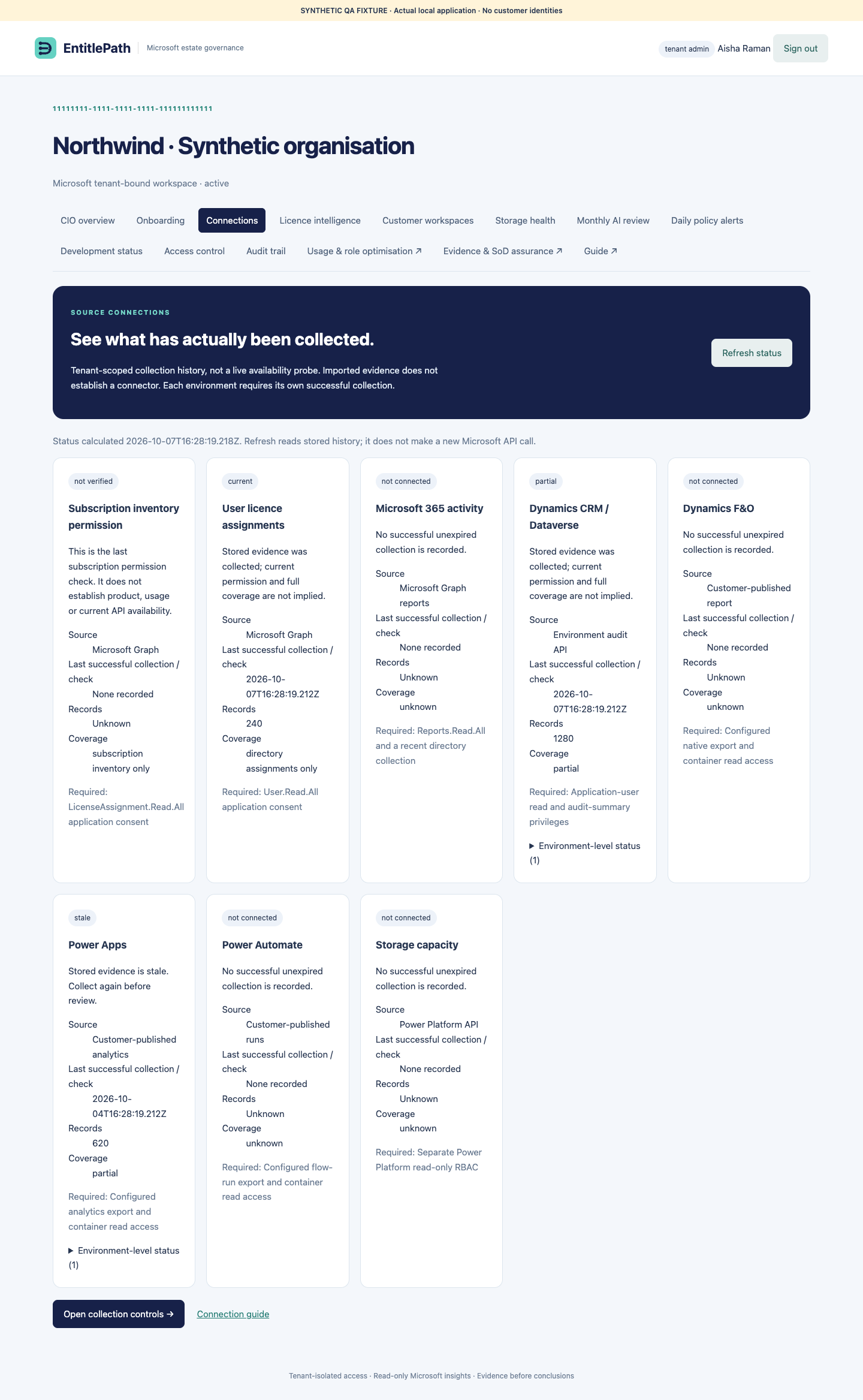
Open Connections for dated collection history for each source and environment.
Current / partial: recent stored evidence exists. Partial data does not prove full usage or licensing coverage.
Stale: evidence needs refreshing. Old permission checks are not current access tests.
Attention required: the latest relevant collection failed or did not finish within its expected window.
Not connected: no successful unexpired collection is recorded. An imported file or configured export endpoint is not proof of connection.
Refreshing this screen reads stored history; it does not contact Microsoft. Use the optimisation collection controls to run a source collection. Subscription inventory consent does not establish Dataverse, F&O, Apps or capacity access. An environment with no collection remains visible even when another environment has succeeded.
Actual application render with isolated synthetic collection history.
Understand operational readiness
EntitlePath distinguishes automated recovery checks from a real production restore. The verified application rehearsal restores isolated synthetic records into a fresh store and checks tenant boundaries and evidence integrity. It does not switch the live database or prove AWS recovery time.
Local customer-scale checks passed at 100, 500, 1,000 and 2,000 users with one grant per user. These checks measure supported synthetic workloads and rejection boundaries. These are local measurements, not an AWS capacity SLA or approval for an untested customer volume. Data collectors, transaction sizes and retained history have bounded limits; an over-limit request must fail explicitly rather than silently discard evidence.
The current pilot database has DynamoDB point-in-time recovery enabled. A production-sized restore and customer acceptance remain separate operational exercises.
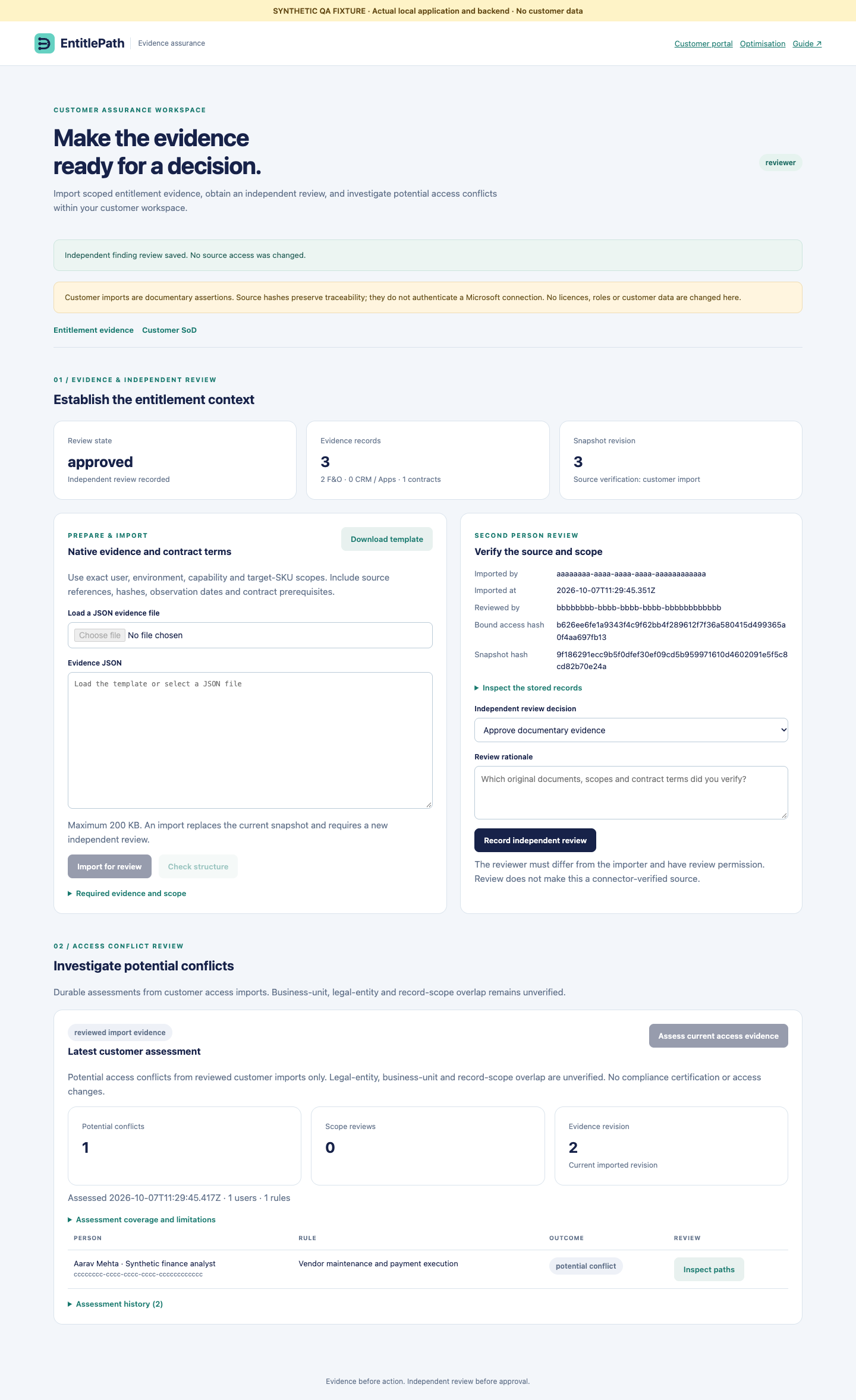
Review entitlement evidence and customer access conflicts
Import current customer access evidence first. Download the entitlement template in the assurance workspace.
Provide scoped native F&O classifications, documented CRM / Power Apps context, and applicable contract requirements. Use exact user, environment, capability and target-SKU identifiers, dated references and source hashes.
Import the completed JSON as a tenant administrator or integrator. The server binds it to the exact access snapshot. An import is documentary evidence, not a verified Microsoft connection.
A different authorised reviewer checks original documents and records an independent approval or rejection. Changing access evidence requires a new entitlement import and review.
Return to optimisation to simulate the exact target. Missing, expired or unsupported facts, base-licence prerequisites and purchase minimums block approval. A supported simulation is a review candidate; it does not execute a licence change.
Assess customer SoD
Select Assess current access evidence. Assessments, grant paths and independent reviews are stored in the tenant's durable workspace. Same-environment co-access is a potential conflict; cross-environment access requires scope review. Legal-entity, business-unit and record overlap are not automatically established. No findings does not prove compliance.
A reviewer must differ from the assessor and the finding subject. Evidence older than 48 hours cannot support a mitigation proposal. Acknowledgement or a request for more evidence does not close the conflict or prove mitigation effectiveness.
Actual application render with isolated synthetic QA records; no customer information is shown.
Customer setup remains necessary
Publisher Graph consent does not grant access to other customer tenants. Customers must approve their own permissions. Dataverse application-user privileges, Power Platform capacity RBAC and F&O / Apps source exports are separate setup steps. Native source-document imports do not install these integrations.
Explore a smaller role before changing a licence
Connect assigned entitlements, observed capabilities and business duties. See what would change before asking an administrator to act.
Open the correct workspace
Customer usage optimisation uses your Microsoft session and tenant-isolated evidence. The demonstration uses fictional people, capabilities and prices behind the pilot login. Neither workspace changes Microsoft roles or licences.
Actual application render of the synthetic usage-optimisation scenario. Prices and entitlement names are illustrative, not Microsoft price or rights guidance.
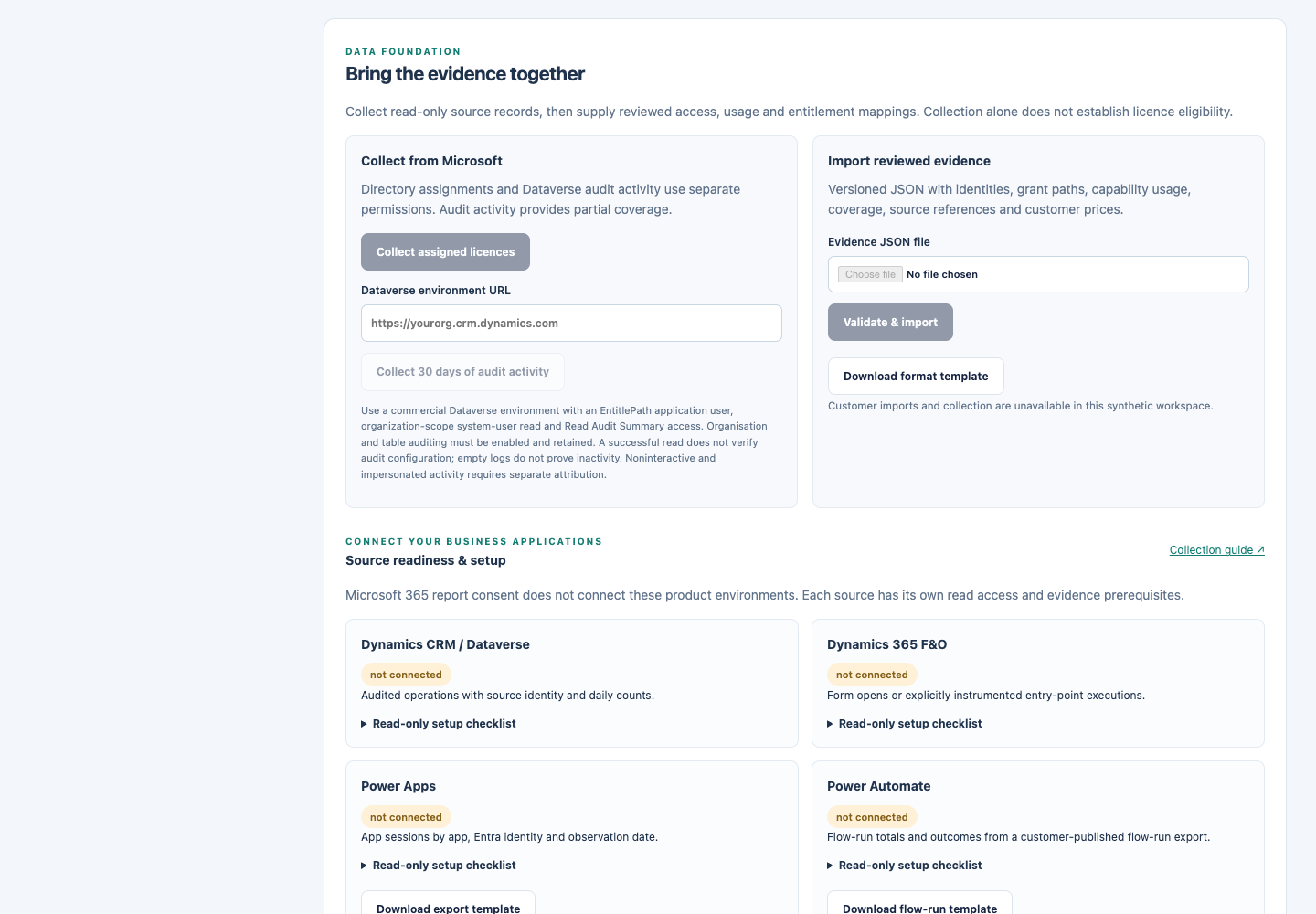
Connect actual evidence
Use Collect assigned licences for a read-only Microsoft Graph user-assignment snapshot. The publisher app requires approved User.Read.All application permission in the customer tenant; subscription-inventory consent alone is insufficient. This action does not grant permissions.
For CRM, provide the Dataverse environment origin and select Collect 30 days of audit activity. Configure the EntitlePath application user in that environment with system-user read and Read Audit Summary privileges. Enabled audit categories and retained records determine what can be observed.
Collection runs asynchronously. Review success, failure and coverage in collection history, then download the typed source records. Audit events are not automatically treated as business-task executions; absent events are not proof of inactivity.
For F&O and Power Apps, configure a published export connection using the exact Azure Storage account, container, JSON blob path and environment. Enable F&O telemetry or Power Apps analytics export in Microsoft, and have your data pipeline publish the approved JSON format. Grant the application Storage Blob Data Reader on that container. EntitlePath automatically reads the published export; it does not install or configure the customer’s source pipeline. Form opens and app sessions remain distinct from business executions.
Download the JSON format template and fill identities, exact grant paths, reviewed capability-to-entitlement mappings, scoped observations, coverage, required duties and actual contract prices. An administrator or integrator can validate and import it. Collection records are kept separately until that mapping is supplied; there is no automatic conversion of raw audit counts to premium-feature use.
Actual application screen in the synthetic demonstration. Customer collection and scheduling controls are disabled here; sign in to your customer workspace to configure them.
Publish the export format
Your source pipeline must emit this versioned format before the automatic reader can collect it. These examples are fictional. Replace identifiers, timestamps and provenance with the actual source evidence; never copy example activity into customer records.
F&O JSON example
{
  "schemaVersion": "entitlepath.usage-export.v1",
  "tenantId": "11111111-1111-1111-1111-111111111111",
  "source": "fo_report",
  "environmentId": "finance-production",
  "generatedAt": "2026-10-07T02:00:00Z",
  "window": {
    "start": "2026-09-07T00:00:00Z",
    "end": "2026-10-07T00:00:00Z"
  },
  "nativeSource": {
    "kind": "fo_application_insights_forms",
    "reference": "customer://approved-query-export/2026-10-07",
    "exporterVersion": "customer-exporter-1.0"
  },
  "coverage": {
    "status": "partial",
    "scope": "Selected production forms after telemetry enablement",
    "reason": "Form telemetry is available; business actions are not instrumented",
    "sampling": "unknown",
    "omissions": [
      "Action execution and pre-enablement history unavailable"
    ]
  },
  "rows": [
    {
      "tenantId": "11111111-1111-1111-1111-111111111111",
      "environmentId": "finance-production",
      "recordId": "source-row-or-stable-aggregate-id",
      "sourceUserId": "source-user-123",
      "userId": "33333333-3333-3333-3333-333333333333",
      "entryPoint": "CustTable",
      "entryPointType": "form",
      "observedAt": "2026-10-06T12:00:00Z",
      "count": 3,
      "unit": "form_opens",
      "interaction": "unknown",
      "sourceRef": "customer://source-observation-reference"
    }
  ]
}
Import reviewed identities, effective grants, capabilities and customer entitlements first.
In collection history, open Preview records. Match the exact source resource and operation to a capability in the same environment. Unknown identities and ambiguous mappings stay unresolved.
Review the complete binding set and select Preview mapping. The server records your identity, source hash and evidence revision.
Future collections automatically produce new mapping drafts using this reviewed binding set. Review the fresh source and apply the preview within ten minutes. This replaces the previous mapped snapshot for that connector and environment, preventing repeated rolling exports from being added twice. Evidence coverage stays partial, and prior UAT approvals become stale.
Microsoft rule coverage and build status
The versioned Microsoft rule pack currently supplies selected restricted-table and premium-use constraints, with source links and a review date. It is a partial guardrail pack, not a complete validated SKU entitlement catalogue. Native F&O licence requirements, customisations, contractual terms and base/attach rights still require reconciliation.
Tenant administrators can open Development status to review implementation, automated-test evidence and customer verification separately. Export collectors require customer setup. The versioned entitlement catalogue supports source-backed review; it does not certify all Microsoft contracts or customer use rights.
Try the two-uses-per-month scenario
In the demonstration, select Alex. The synthetic treasury task has two observed executions while routine work is frequent.
Select the treasury grant path to remove. Deselect the illustrative advanced entitlement and select the routine entitlement.
Run the simulation without reassignment: the required month-end duty prevents the change.
Open the business assumptions, assign that duty to Priya, confirm the hypothetical business/capacity assumptions and explain the change. Rerun to inspect the mapped-entitlement candidate and illustrative run-rate difference.
Review alternate grant paths, lost capabilities, recipient access, SoD conflicts and mapping versions. A lower-frequency label never makes a licence reduction valid by itself.
Review and storage
Download the exact change plan. A tenant administrator or reviewer can record an eligible scenario as approved for UAT; this is a testing decision, not a Microsoft access change or contractual compliance conclusion. Updated evidence invalidates previous review currency. Scenario assumptions are separate from authenticated review records.
Mapped evidence uses immutable typed DynamoDB snapshots with integrity checks. Source collections have a 180-day TTL and collection jobs expire after seven days. UAT approval validity ends after seven days or an evidence change; the review record remains available for audit. The service enforces expiry while DynamoDB deletion is asynchronous. Use Recurring collection to opt into daily or weekly refreshes after a successful first collection. The durable worker resumes after restart, retries failed runs up to three attempts, and then pauses for attention. Removing the schedule owner’s collection permission stops future reads. Pausing a schedule prevents subsequent runs; an already-started read may finish.
Run-rate potential is not an invoice saving.
Use actual customer prices and confirm term commitments, renewal dates, base/attach rights and replacement costs. Do not add overlapping scenarios together. Shared accounts, proxy automation or temporary licence rotation are not treated as an entitlement workaround.
Partial entitlement evidence checks
The optimisation workspace shows bounded checks from stored Graph assignments and reviewed Dataverse audit mappings. Each check retains its source, scope and blockers. An assigned prerequisite is not observed feature use. F&O usage exports do not contain native licence classifications, and Power Apps session exports do not establish premium dependencies or billing coverage. These checks cannot certify a complete Microsoft entitlement catalogue or automatically approve a downgrade.
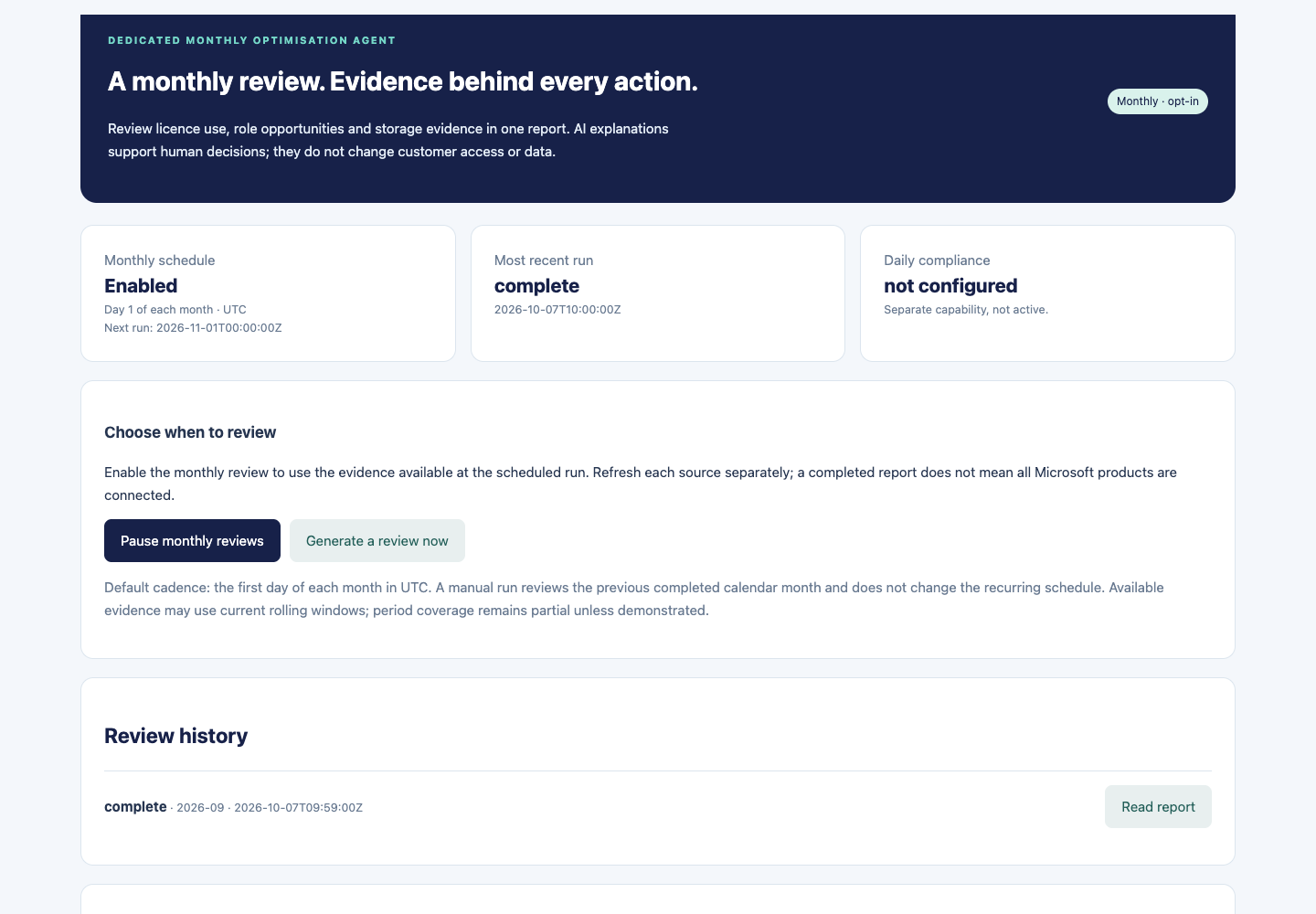
Monthly optimisation review
A dedicated read-only agent reviews current evidence monthly. Policy alerts belong to a separate monitoring workflow.
Open Monthly AI review in the customer portal. A tenant administrator can enable the monthly schedule.
The schedule runs on the first day of each month in UTC. A manual run is also available. Both use the previous completed calendar-month label and retain the actual source observation dates.
Review the report's source coverage: current assignments and rolling usage windows do not establish complete calendar-month history. Missing sources stay explicit.
Read the deterministic recommendations, evidence references, blockers and optional AI explanation. If the model is unavailable or its output is withheld, the rule-based findings remain available.
Take a reviewed proposal to the accountable owner. The agent does not change licences, roles, retention or customer data, and it does not send external messages.
Scheduling and permissions
Schedules are opt-in per customer. Reports and source hashes persist across application restarts. Administrator access is checked before runs; revoked access stops execution. One report is retained per review period. Daily compliance alerts are not enabled by this monthly schedule; their current availability is shown separately.
Storage and audit recommendations
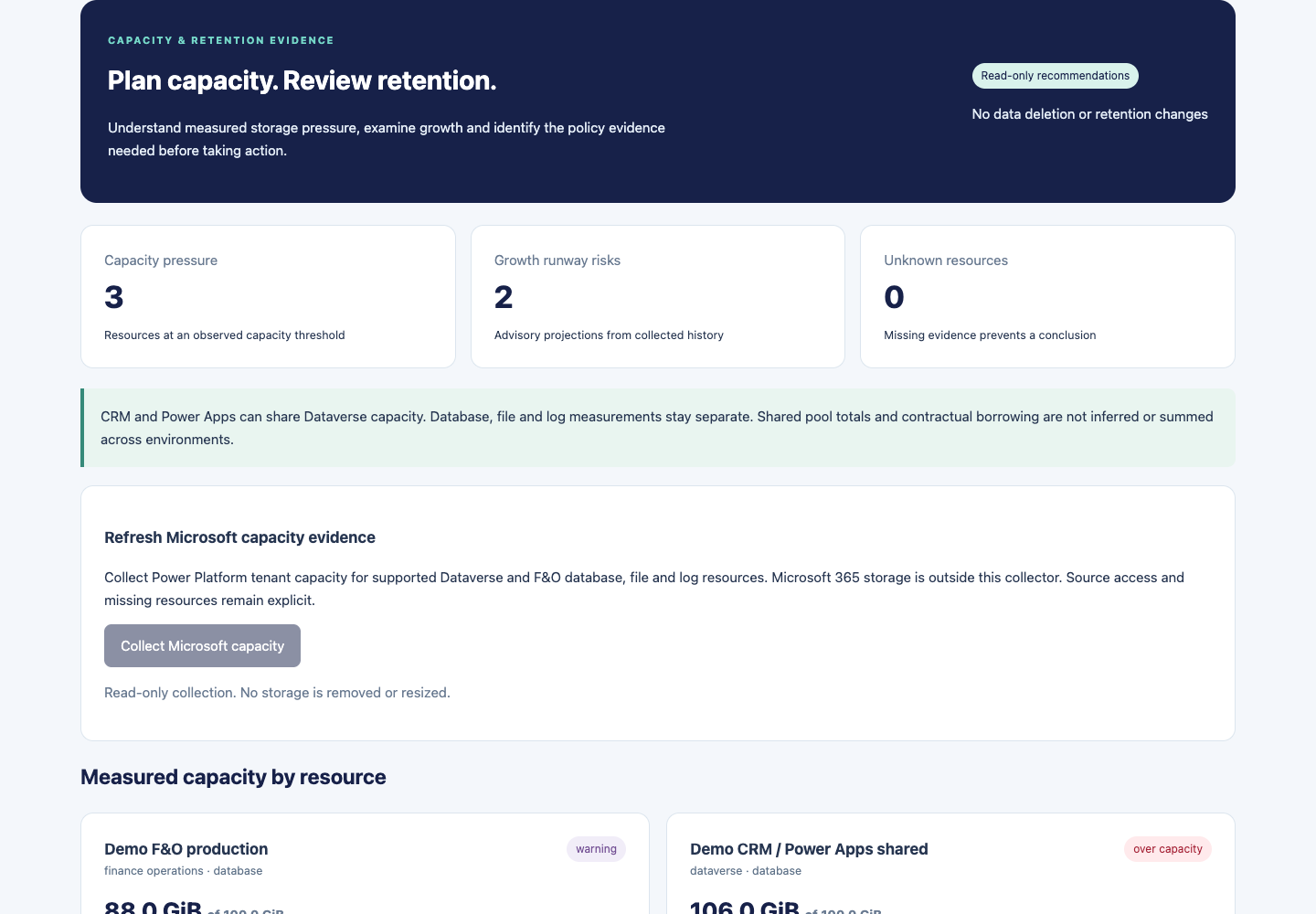
The storage page evaluates supplied Dataverse and F&O database, file and log observations. It highlights capacity pressure, comparable growth trends, missing measurements and retention evidence. CRM and Power Apps sharing Dataverse must not be double-counted.
Import dated capacity measurements and optional reviewed audit policies with the resource, storage category, retention days, legal-hold status, source, observation date, policy reference and reviewer. Unknown or active holds block cleanup conclusions. Log bytes alone do not identify audit-record age or deletion eligibility.
Native read-only Power Platform tenant capacity collection is available from Storage health, subject to separate Power Platform API authorisation. Audit configuration and retention are separate evidence; capacity collection does not collect them. Savings and recoverable bytes remain unknown without item-level eligibility and contract evidence. AI cannot supply missing facts.
Actual application storage screen with synthetic reference measurements; not customer data.Actual monthly review interface rendered using synthetic browser-test responses. This verifies the interface; it is not evidence of a completed customer AI run.
Daily policy and evidence checks
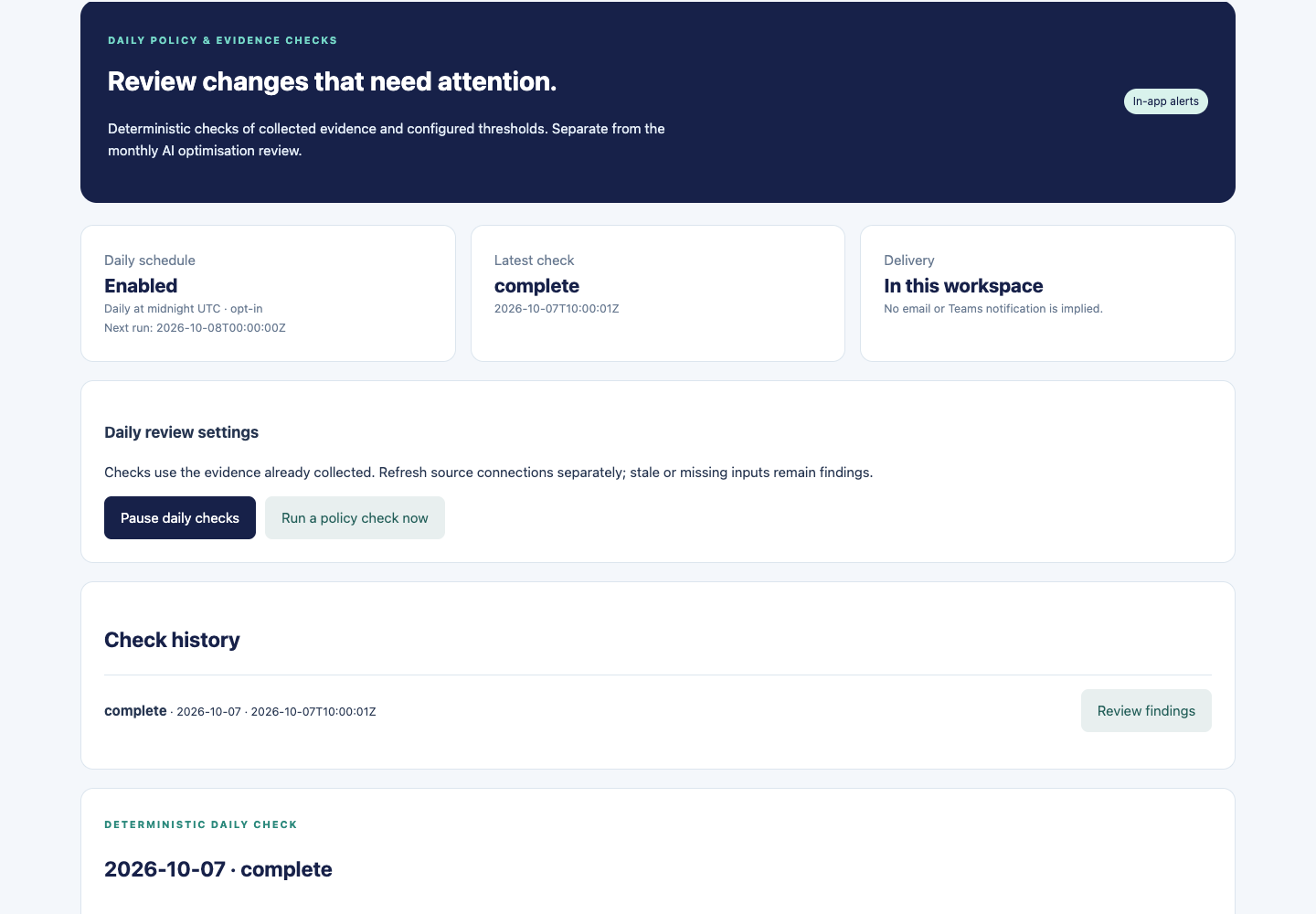
Daily checks highlight issues in stored evidence. They are separate from the monthly AI optimisation review.
Open Daily policy alerts in the customer portal.
A tenant administrator can select Enable daily checks. The schedule is opt-in and runs at midnight UTC. Enabling it does not enable the monthly agent.
Use Run a policy check now for a manual check. Open Review findings in check history to inspect the report.
Review capacity thresholds, assignment reconciliation, stale evidence, missing connections and reported active holds alongside the cited source evidence.
Refresh sources using their separate collection workflows. Daily checks evaluate stored evidence; they do not automatically refresh every Microsoft source.
In-app, deterministic and read-only
Reports are retained within the customer workspace and survive application restarts. Administrator access is rechecked before scheduled execution. Missing coverage stays unknown. This feature does not send email or Teams notifications, use AI to establish compliance, or change licences, access, retention or data. It does not certify regulatory compliance.
Actual locally rendered application interface with synthetic administrator fixtures, 7 October 2026. Not a live customer report or evidence of a customer schedule being enabled.
Track implementation separately from acceptance
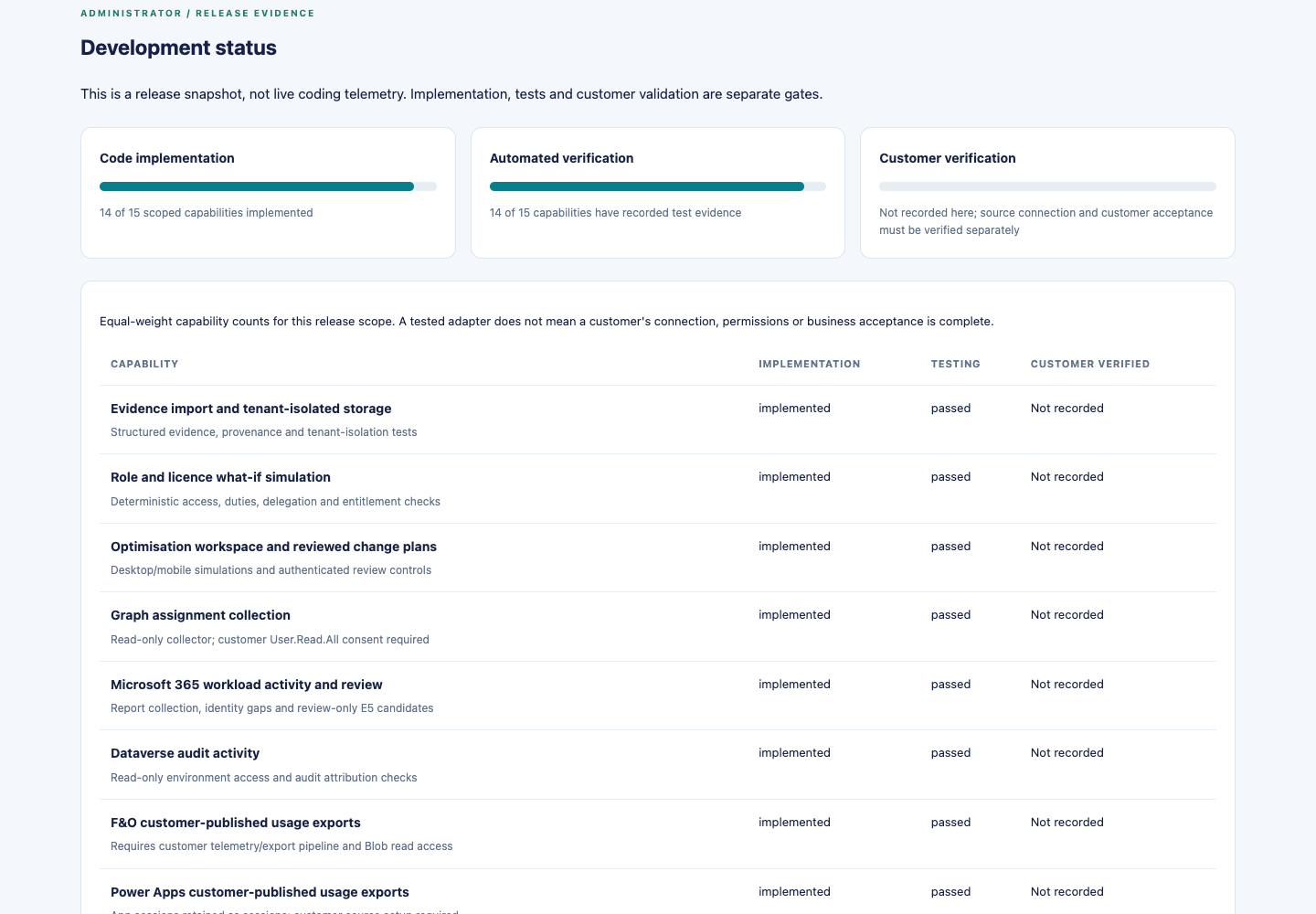
Tenant administrators can open Development status in the customer portal. This page is not shown to non-administrator roles or the public demonstration viewer.
Read implementation, testing and QA evidence separately. A completed code item does not prove a customer connection, exhaustive licence coverage, customer acceptance or production readiness. The status view records the remaining work and evidence boundaries; it does not certify compliance.
Comprehensive validated Microsoft entitlement catalogues and customer-specific licensing decisions remain separate validation work. Reviewed custom mappings, source permissions and representative customer tests are still required.
Actual locally rendered administrator interface using synthetic session fixtures, 7 October 2026. Build progress is separate from live customer validation.
Connect your business applications
Each environment needs its own source access. Microsoft sign-in and subscription consent do not enable application telemetry.
Read the environment status
The optimisation workspace shows each registered connector or Dataverse environment separately. Configured means setup was saved; it does not mean data was collected. Partial means source records were collected but do not establish complete activity or licence rights. Stale and failed sources need attention before decisions.
Dynamics CRM / Dataverse
Provide the environment URL and create the EntitlePath application user in that customer environment.
Assign a reviewed read-only security role with system-user read and Read Audit Summary privileges.
Enable the required auditing and confirm retained history. Collection cannot reconstruct events before auditing was enabled.
Collect audit activity, inspect source identities and system/application attribution, then reconcile current roles and reviewed entitlement mappings.
Dynamics 365 Finance & Operations
Enable approved Application Insights form telemetry or reviewed customer instrumentation for actual actions.
Publish the versioned JSON usage snapshot using a customer-owned export job. Security-role reports and sign-ins alone are not transaction execution evidence.
Grant the EntitlePath service principal Storage Blob Data Reader on the dedicated private export container.
Register the exact storage location and environment, collect once, reconcile records, then opt into a recurring collection.
Power Apps
Configure Microsoft's supported analytics export where available in the customer tenant.
Transform the approved ADLS app-session data into the versioned export envelope. The workspace provides an empty template; placeholders must be replaced with actual source metadata.
Publish to the dedicated private container, grant read access and register the exact environment.
Collect and review app/session/user identities. App sessions do not establish premium connector use; app dependencies, access and licence rights require separate evidence.
Power Automate
The flow-run adapter reads a customer-published export of retained Dataverse flow-run records. The customer must configure run-history availability and their export job. Register it as a separate Power Automate connector.
Run counts, outcomes and last-run times are shown by flow. Flow owners and reported triggering identities are not treated as verified consumers. Automated and scheduled runs cannot establish personal licence use. Process licences, premium connectors, attended/unattended rights and contract terms remain separate review inputs.
What is not automatic
These adapters do not install telemetry, enable Microsoft export jobs, grant permissions or change source roles/licences. Azure container RBAC is separate from Graph consent. Each successful source read must still be reconciled against business duties, security grants and licensing evidence.
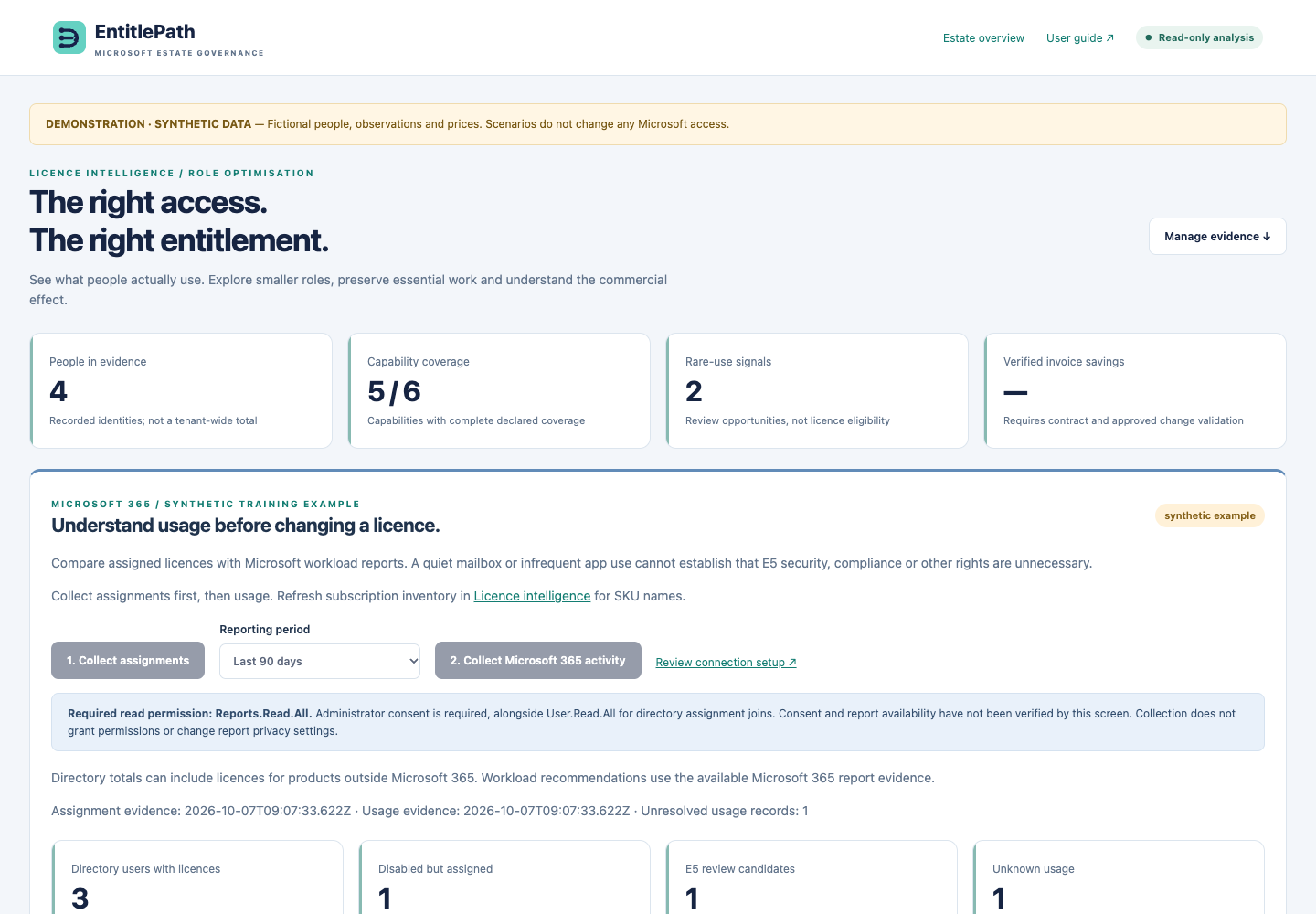
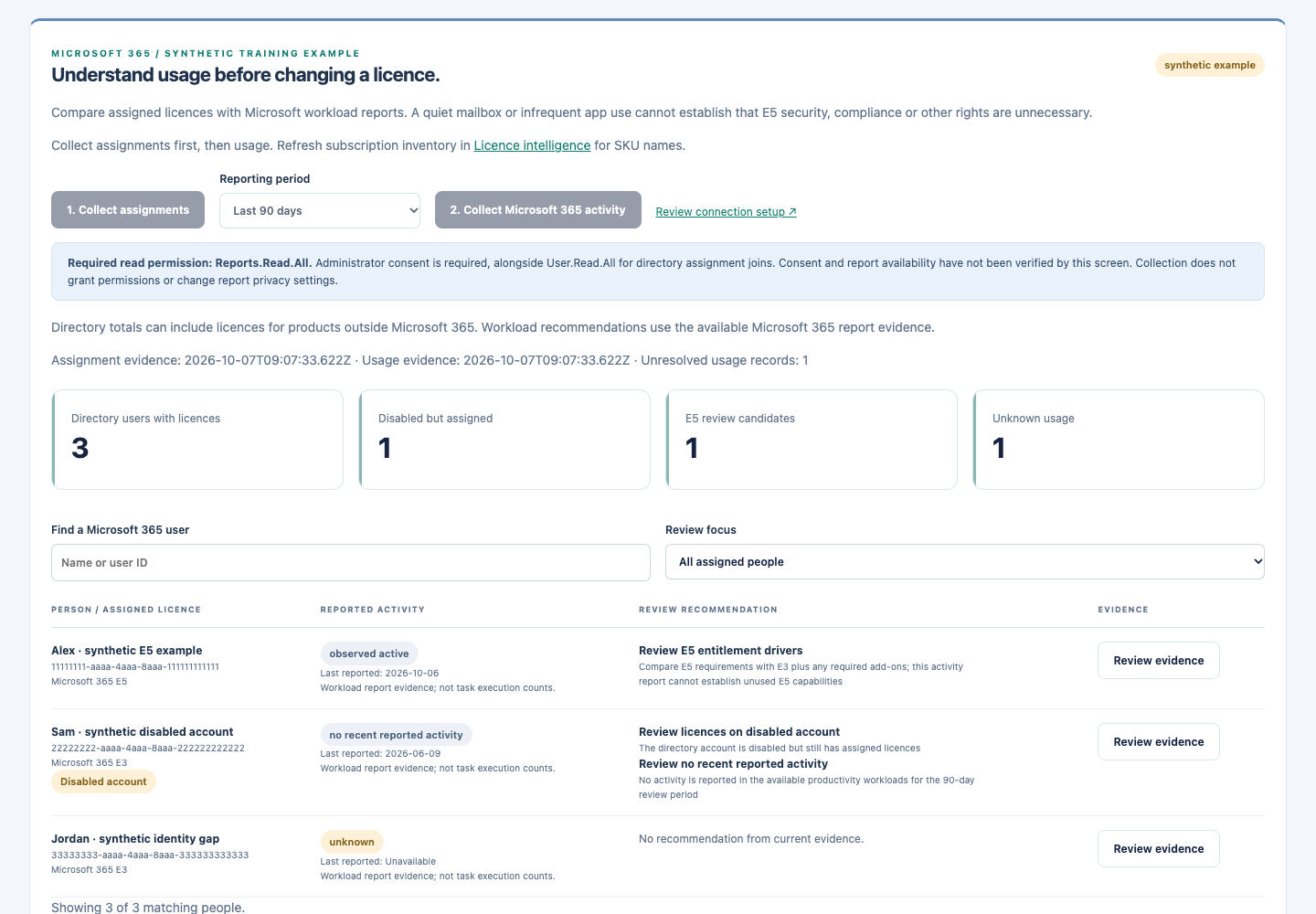
Match current licence assignments with Microsoft’s actual workload activity reports. Review account and entitlement questions with the customer before making any change.
Permission setup is separate from deploying the code.
The publisher application must request Microsoft Graph application permissions User.Read.All and Reports.Read.All, and the customer administrator must consent in the customer tenant. Existing subscription inventory uses LicenseAssignment.Read.All. The collector does not grant these permissions, read email content or write licences.
Open customer onboarding and sign in to the correct customer tenant. Complete the administrator’s permission review. Rechecking subscription consent verifies subscription access only; actual successful collections verify the other permissions.
On Licence intelligence, sync subscription inventory for the customer’s reported SKU names and quantities. Import procurement evidence separately to reconcile purchases.
Open usage optimisation. Collect user assignments first, then select D30, D90 or D180 and collect Microsoft 365 usage. The customer API requires an assignment snapshot from the preceding 48 hours; D90 is the default.
Review Exchange, OneDrive, SharePoint, Teams, Yammer and Skype for Business last-activity dates where Microsoft supplies them. Email and Teams detail reports add reported counts. Unavailable detail reports and blank values remain unknown; a zero count remains zero.
Open each user’s evidence. Review disabled accounts with licences, assignment errors, overlapping assignment paths and available older activity. Duplicate assignment paths do not mean duplicate billed seats.
Enable a daily or weekly Microsoft 365 collection schedule after successful collection. Refresh directory assignments regularly too; stale directory evidence prevents new user-level usage joins.
Identity and privacy
Microsoft usage reports may conceal identifiers. EntitlePath leaves that setting unchanged and matches only a unique exact user principal name in the tenant’s directory snapshot. Hidden, ambiguous, deleted or conflicting identities remain unresolved. A customer administrator must decide whether identifiable reporting is appropriate; the application does not bypass anonymisation.
E5-to-E3 requires more than activity
The report flags E5 entitlement drivers for review. Low email or Teams use does not establish that Defender, Purview, retention, legal holds, Windows, Entra policies, voice or other benefits are unused. These checks remain blockers to automatic downgrade. The catalogue currently identifies exact Microsoft 365 E3/E5 SKUs; other variants retain their inventory identifiers and need separate entitlement review. Directory assignments can include non-M365 products, while the usage measurements here cover the listed Microsoft 365 workloads.
No licence is changed and no invoice saving is claimed. Customer contract, business-owner and security/compliance review remain required.
POC boundaries
This first collector uses the commercial-cloud Graph report APIs. It has explicit safety limits: 2 MB per downloaded CSV, 5,000 rows per source report, 10,000 normalized workload records and 1.8 MB normalized evidence. Six workloads can produce multiple rows per user, so these are not a guarantee of support for a 5,000-user tenant. Oversized collections fail visibly rather than silently truncating data. Larger tenants need a scaled collection/storage path before rollout.
Report refreshes may lag collection time. Blank or missing activity does not prove inactivity. The original Dynamics build percentage is separate from successful customer M365 connectivity and validation.
Actual application render using fictional training records. This does not show connected customer usage or validated savings.
See capacity pressure before it becomes an incident
Open Storage health.
Review platform, resource, capacity type, used capacity, limit and source observation date.
Check warnings and critical thresholds. Missing limits or stale observations must be investigated rather than interpreted as healthy.
Use growth forecasts only when timestamped history supports a positive growth rate.
The workspace supports imported capacity evidence and a native read-only Power Platform tenant capacity collector. Select Collect Microsoft capacity when your role permits collection. The collector calls the Microsoft Power Platform API, verifies the returned tenant, preserves actual and rated values with their source timestamps, and normalises supported Dataverse and F&O tenant capacity pools. A successful response can still have missing categories or observations; missing values remain unknown. Keep database, file and log capacity separate. CRM and Power Apps can share a Dataverse pool; do not count it twice. Shared-pool borrowing and allocation are not calculated by this release.
Separate Microsoft authorisation
Microsoft sign-in and Graph administrator consent do not grant Power Platform API access. A customer administrator must assign the appropriate Power Platform API service-principal RBAC access separately. A permission-required result is a connection blocker, not zero storage usage. EntitlePath does not grant this permission on your behalf. Collection is read-only and does not change capacity allocations, audit settings or retention.
Source totals do not provide table-level storage, per-environment allocation, audit-record age or deletion eligibility. Retention and legal-hold evidence must be reviewed separately. Native collection availability is not proof that a particular customer source has connected.
Storage health · Actual locally rendered application screen, 7 October 2026, using synthetic reference measurements. Not a live customer collection. Click to enlarge.
A forecast is an estimate based on observed growth, not a guaranteed exhaustion date.
A CIO view that explains what is known
Try the read-only reference dashboard
From the workspace, select CIO dashboard · Demo, or open the demonstration dashboard after pilot sign-in. Its banner identifies dummy data. Explore Overview, Licence intelligence and Storage health; Microsoft synchronisation and imports are disabled for the demo viewer.
CIO dashboard: priority risks, coverage and storage pressure · Actual deployed screen, 6 October 2026. Dummy data for reference only; not customer observations. Click to enlarge.
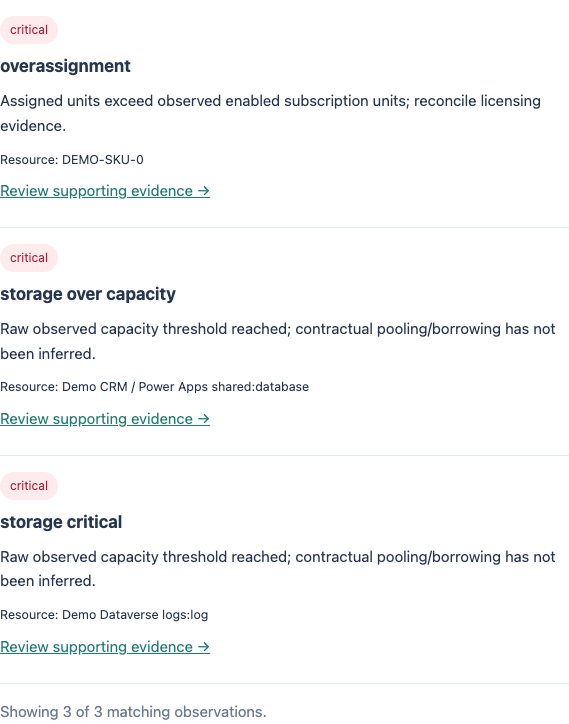
Use CIO overview to review the available licensing and storage evidence alongside connector readiness. Read coverage and freshness before interpreting any health indicator. Filter the priority worklist by severity, inspect the highest storage utilisation and follow each observation to supporting evidence. The accountable owner comes from onboarding; suggested actions are not automatically assigned tickets.
Licence exposure: assignment issues and the supporting entitlement evidence.
Capacity pressure: current utilisation, thresholds and supported growth forecasts.
Access governance: customer members, responsibilities and audit history where your role permits.
Evidence coverage: connected, missing and pending sources. Unknown is never a green health score.
Actual deployed worklist filtered to critical observations, using dummy data. These are observations and suggested next steps, not automatically assigned remediation tasks.
Additional CIO coverage planned
Identity security, Defender, Purview, service incidents, recovery evidence, customisation changes and wider operational telemetry require their own integrations. They are not live measurements in the current portal. A complete Microsoft stack health claim requires those sources and validated product coverage.
Prepare the real customer rollout
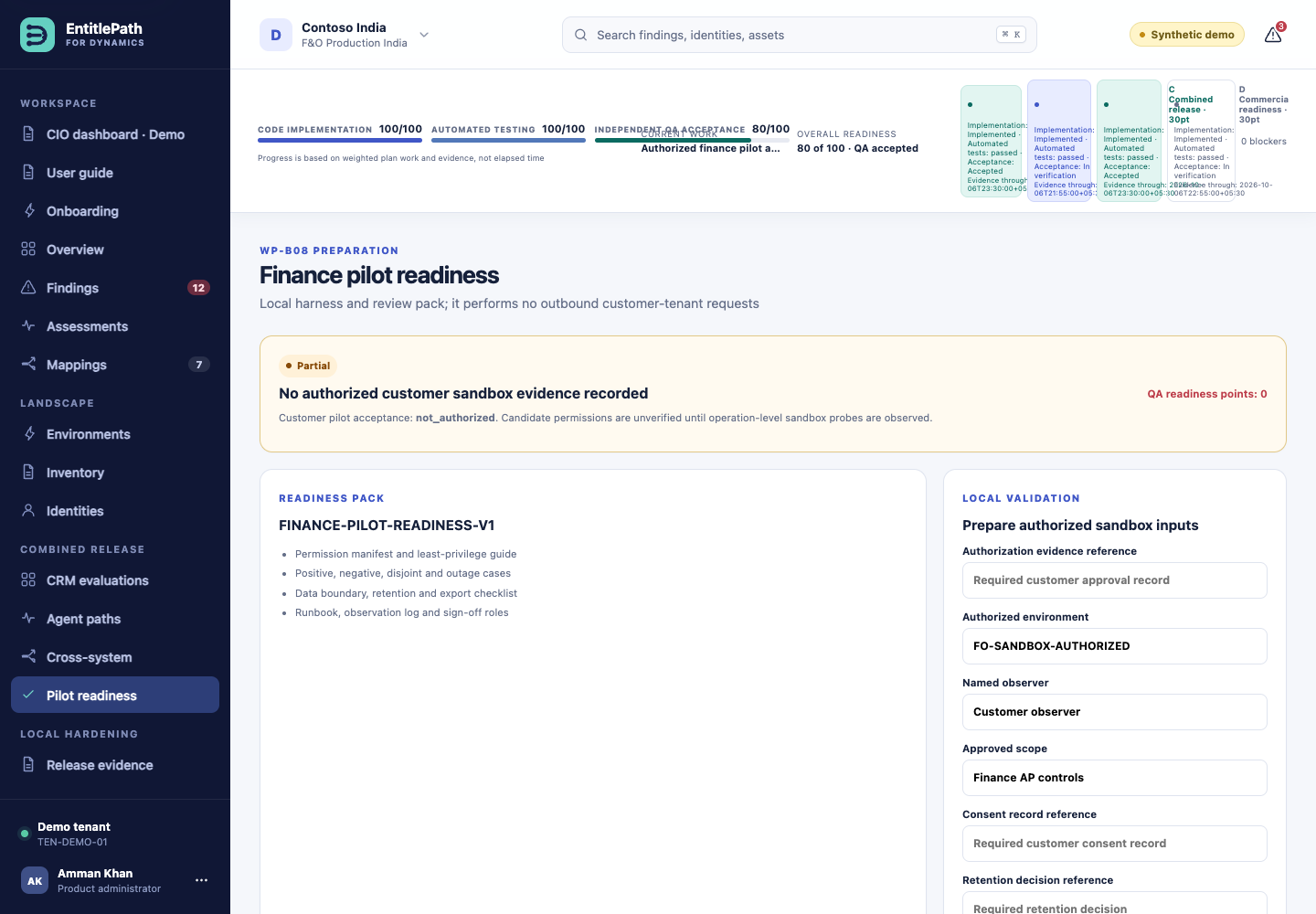
Open Pilot readiness to inspect the preparation checklist. Local checks do not contact a customer tenant or grant production approval.
Demo readiness checklist: preparation inputs, not production approval · Actual deployed AWS evaluation capture, 6 October 2026. Click to enlarge.
Agree the customer tenant, environment, approved scope, named observer, consent and retention requirements.
Verify customer Entra sign-in, application consent and tenant-bound roles. Use the consent recheck if approval was completed in Entra rather than the application callback.
Implement and validate read-only connectors in an authorized sandbox, including customisations and negative permission tests.
Validate recovery for the durable customer record store and add durable customer SoD assessment storage before connecting production collectors.
Evaluate AI against representative customer cases and independent review outcomes.
Complete operational, security and release acceptance before customer production use.
Where data lives today
Customer account, membership, onboarding and estate evidence records use a separate encrypted DynamoDB table with point-in-time recovery enabled. Licence, procurement, usage and capacity evidence are stored as versioned, typed snapshots with integrity checks. Session and invitation expiry is enforced by the service. A restore drill and an approved history-retention workflow are still required.
The synthetic SoD evaluation workspace still uses SQLite on temporary ECS storage; its sample findings and demo audit history reset on task replacement. Do not put customer production data into that workspace. Customer-specific consent, product application-user privileges and source coverage must still be verified.
When something looks unexpected
Symptom
What to do
Old Sentinel branding
Use the AWS URL, not an older Sites preview.
Pending consent after Microsoft sign-in
Open customer Onboarding, select Review Microsoft permissions and have the customer Global Administrator accept. Then use Recheck existing consent. Microsoft returning 403 means required read permission is still missing.
Microsoft login appears simulated
The SoD evaluation wizard is a synthetic rehearsal. Use /onboard for real customer sign-in.
Offline demonstration banner
The UI is using fixture fallback. Do not interpret this as a successful backend operation; reload and check service availability.
Finding unavailable
Check the finding ID and selected demo tenant. Foreign-tenant objects intentionally return no details.
Drafts or audit records reset
A task replacement can reset the ephemeral SQLite database.
Brief outage during deployment
The single-task pilot is replaced during updates. Retry once the service is healthy.
100% build progress
Read the separate QA and readiness evidence. Fixture code completion is not customer acceptance.
Plain-language glossary
SoD
Segregation of duties: separating capabilities that could create an unacceptable conflict when held together.
Scope
The company, business unit, records or other boundary where access applies.
Execution identity
The account whose permissions actually run an action.
Evidence gap
A missing, stale or unverified fact that limits the conclusion.
Mapping
A reviewed link between a technical permission or custom asset and a business capability.
Fixture
Synthetic test data used to demonstrate and verify behaviour.
Guide version: 7 October 2026 · aws030 connected dashboard, purchase evidence and sign-in recovery release · Screenshots are mapped to their stated workflow. Demo screenshots contain synthetic records and prices; the public customer entry screen contains no customer records. Passwords and customer credentials are not included.
Customer workspaces and Microsoft organisation names
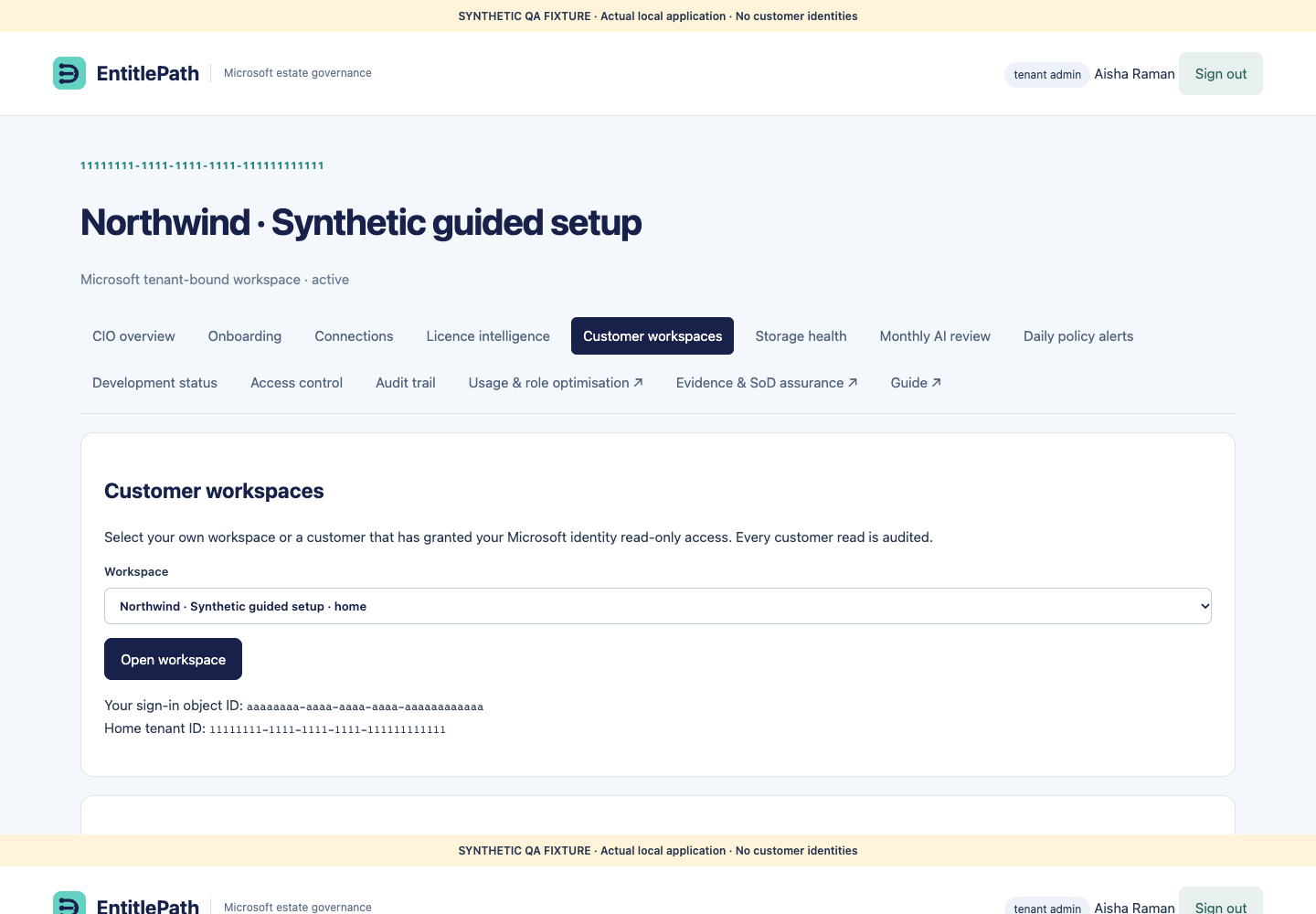
Open Customer workspaces in the portal. Your home workspace is always listed. Other customers appear only after their administrator grants your home Microsoft tenant ID and object ID read-only access. Both identifiers are shown on this page.
The customer opens Customer workspaces and enters your two identifiers under Allow an external customer support viewer.
You reopen Customer workspaces, select the customer, and choose Open workspace.
A read-only banner identifies the selected customer. Reads are audited; the customer can revoke access immediately.
Customer administrators can select Fetch Microsoft organisation name to read the tenant’s display name from Microsoft Graph. Organization.Read.All application permission is required. A failed lookup preserves the existing name.
Subscription quantities versus invoice details
Licence intelligence automatically shows Microsoft-enabled seats and assigned seats from Graph. Invoice quantity, negotiated unit price and contract reference are optional separate evidence. Missing invoice data does not prevent subscription inventory collection. Workload review messages show the product and counts of matched, active and unknown people.
Azure supports product connections
No Azure cost dashboard is included. Microsoft Entra identifies the tenant and application. CRM needs an environment application user and read privileges. F&O and Power Apps published exports need their approved Azure Blob connection link and application container-read access. Power Platform capacity requires its own read permission. Review each product in Connections and Onboarding.
 EntitlePath